






 Apr 29, 2016, 05:39 PM
Last edit by: IB Advertising
See related guides and technical advice from our community experts:
- Camaro and Firebird How to Add AUX Input MP3 Player without Adapter<br>Step by step instructions for do-it-yourself repairs.

How you can add an aux input/mp3 player without an adapter

Thread Starter
Launching!

Joined: Jan 2003
Posts: 254
Likes: 1
From: Rice Lake, WI
 How you can add an aux input/mp3 player without an adapter
 I've finally decided to switch my 98 Camaro CD unit out for an aftermarket HU, and now I'd like to move it into my Grand Am. Since I don't have to worry about killing it now, I've decided to take it part and try to add an aux input (which isn't even possible with adapters in a 98). I've done something similar to an old head unit before, here's what I've found so far.
The amp seems to be on the main board board, so there isn't an easy way to tap in there like there was on my old head unit. No easy route from the radio, either. However, the CD player is a self-contained unit with a ribbon cable, so audio must be passing over it.
Here's a picture of the bottom of the CD player, with the CD connector circled:

Now, here's a closeup of the connector. I tapped in a couple of leads to a set of powered speakers to locate the wires carrying sound. I've labeled the left and right channels. It appears that some later models may have a connector with more pins, but the 1st and 3rd pins are still correct. Use the metal stereo chassis as a ground.

So it's just a simple matter of splicing into those three wires with a special jack. This will allow the CD audio to pass through the jack fine when nothing is plugged in. When you plug in a cable into it from your MP3 player or whatever, it physically disconnects the audio to the CD player, and instead passes along the signal from your cable. You will need to have your CD player playing for this to work, even though it's using audio from your MP3 player. I know some of the aftermarket adapters that plug in between the HU and the cd changer work the same way, the changer plays, but it replaces the audio.
A quick search of radio shack.com returns the 274-246 for $2.99
jack
However, unlike the old HU I modified, I don't think you can easily put a jack into the face of this head unit, since there is a circuit board running behind plate. You can't just drill a hole and stick it through. See here:

So I think the solution would be to run a 6ft+ wire through the back of the HU with a jack at the end you could run into glove box or into the console. The panel mount jack from radio shack isn't really the best for that, but it would work. I'm sure one of the big online electronics suppliers have something better.
So for a couple of bucks and fairly basic electronics knowledge, splicing into three wires, you should be able to an an aux-input to any 98+ camaro HU.
What do you guys think?
The amp seems to be on the main board board, so there isn't an easy way to tap in there like there was on my old head unit. No easy route from the radio, either. However, the CD player is a self-contained unit with a ribbon cable, so audio must be passing over it.
Here's a picture of the bottom of the CD player, with the CD connector circled:
Now, here's a closeup of the connector. I tapped in a couple of leads to a set of powered speakers to locate the wires carrying sound. I've labeled the left and right channels. It appears that some later models may have a connector with more pins, but the 1st and 3rd pins are still correct. Use the metal stereo chassis as a ground.
So it's just a simple matter of splicing into those three wires with a special jack. This will allow the CD audio to pass through the jack fine when nothing is plugged in. When you plug in a cable into it from your MP3 player or whatever, it physically disconnects the audio to the CD player, and instead passes along the signal from your cable. You will need to have your CD player playing for this to work, even though it's using audio from your MP3 player. I know some of the aftermarket adapters that plug in between the HU and the cd changer work the same way, the changer plays, but it replaces the audio.
A quick search of radio shack.com returns the 274-246 for $2.99
jack
However, unlike the old HU I modified, I don't think you can easily put a jack into the face of this head unit, since there is a circuit board running behind plate. You can't just drill a hole and stick it through. See here:
So I think the solution would be to run a 6ft+ wire through the back of the HU with a jack at the end you could run into glove box or into the console. The panel mount jack from radio shack isn't really the best for that, but it would work. I'm sure one of the big online electronics suppliers have something better.
So for a couple of bucks and fairly basic electronics knowledge, splicing into three wires, you should be able to an an aux-input to any 98+ camaro HU.
What do you guys think?
Last edited by Jason Novak; Jan 5, 2008 at 01:12 AM.

Well I followed the instructions from the other website you posted on and it worked great. Bought the Radio Shack 274-246 and a cable for my iPod. Total cost was roughly $8. The only thing is you have to have a CD in the radio first then plug in the iPod. Once the iPod is connected you control it as normal and it plays through the radio. Alot better then FM modulators, nice clean sound. I located the 274-246 jack in the panel next to the convertible top switch (did not want to screw up the radio if I messed up by trying to put it there).
Not having a HU that was able to control a CD Changer this is a great option. And for the price you cannot go wrong.
Not having a HU that was able to control a CD Changer this is a great option. And for the price you cannot go wrong.
Last edited by Tom99SS; Apr 14, 2007 at 07:04 PM.
Thread Starter
Launching!
Joined: Jan 2003
Posts: 254
Likes: 1
From: Rice Lake, WI
Glad to hear it's working well for you  It's probably best to mount the jack remotely. Not a lot of room in the face plate, and it would be easy to mess up and pretty hard to fix. Saves a lot of time, too.
I'll update this thread with all the instructions
It's probably best to mount the jack remotely. Not a lot of room in the face plate, and it would be easy to mess up and pretty hard to fix. Saves a lot of time, too.I'll update this thread with all the instructions
Thread Starter
Launching!
Joined: Jan 2003
Posts: 254
Likes: 1
From: Rice Lake, WI
Ok, I've completed this project and it works great. Although I put the jack directly into the faceplate, I'd recommend against it since it's hard to find space to install it that can be used once the stereo is installed.
The switch is radio shack part #274-246 for $2.99 link
I recommend using a piece of networking/cat5 for the wiring. I had planned to have use solid colors as circuit board connections, but switched two when I was soldering so you may want to ignore the colors. Here's a picture of the jack soldered up
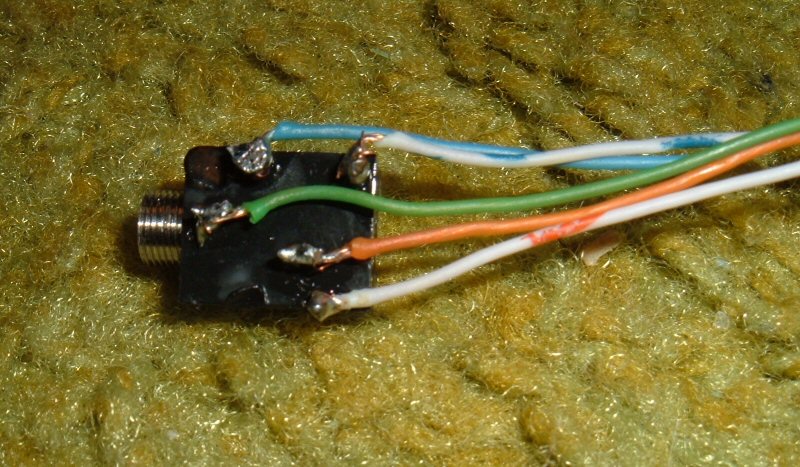
Here are the details on the connections:

Pin 1 - Ground - connect to the stereo chassis
Pin 2 - Left Channel - wire from CD connector on main circuit board
Pin 3 - Left Channel - wire coming from CD player module
Pin 4 - Right Channel - wire coming from CD player module
Pin 5 - Right Channel - wire from CD connector on main circuit board
Here is the jack wired into the CD connector. Note my wires run into the face, you'll probably drill a hole in the back of the case and run the wire out there.
Soldered everything and taped it.

The switch is radio shack part #274-246 for $2.99 link
I recommend using a piece of networking/cat5 for the wiring. I had planned to have use solid colors as circuit board connections, but switched two when I was soldering so you may want to ignore the colors. Here's a picture of the jack soldered up
Here are the details on the connections:
Pin 1 - Ground - connect to the stereo chassis
Pin 2 - Left Channel - wire from CD connector on main circuit board
Pin 3 - Left Channel - wire coming from CD player module
Pin 4 - Right Channel - wire coming from CD player module
Pin 5 - Right Channel - wire from CD connector on main circuit board
Here is the jack wired into the CD connector. Note my wires run into the face, you'll probably drill a hole in the back of the case and run the wire out there.
Soldered everything and taped it.
Last edited by Jason Novak; Jan 5, 2008 at 01:12 AM.

Teching In
Joined: Sep 2005
Posts: 12
Likes: 0
This is a really great post. I have a question. Right now, my HU doesn't play CDs if it is real cold and humid. It isn't affected when it's hot and humid. So, I get the Err message during these conditions. In your opinion will this mod not work when I am having that trouble?
Trending Topics
LS1 Tech Stories
The Best V8 Stories One Small Block at Time

6 Common C5 Corvette Failures and What's Involved In Repairing Them
Pouria Savadkouei
Retro Modern Bandit Pontiac Trans AM Comes With Burt Reynolds' Autograph
Verdad Gallardo
Top 10 Greatest Cadillac V Series Performance Models Ever, Ranked
Pouria Savadkouei
Top 10 Most Powerful Chevy Trucks Ever Made!

Hennessey's New Supercharged Silverado ZR2 Has 700 HP
Verdad Gallardo
Coachbuilt N2A Anteros Is an LS2-Powered C6 Corvette In Italian Clothes
Verdad Gallardo
Awesome K5 Blazer Restomod Comes With C7 Corvette Power
Verdad Gallardo
10 Camaros You Should Never Buy

10 LS Engine Myths That Refuse to Die
Verdad Gallardo




Staging Lane
Joined: Jun 2007
Posts: 57
Likes: 0
I would LOVE to do this, but I am scared I would mess it up pretty bad and cause the radio to fail. I don't have much spare money so a total cost of 10 bucks compared to 70 for the adapter would be nice! Plus, I am sure my dad would flip **** if he saw me attempt this. 
Thread Starter
Launching!
Joined: Jan 2003
Posts: 254
Likes: 1
From: Rice Lake, WI
If you mess up it's pretty easy to fix, you just need to re-attach the 3 cut wires on the CD connector and it will be back to normal. You really shouldn't be able to hurt it unless you drip solder on the circuit board or something
Thread Starter
Launching!
Joined: Jan 2003
Posts: 254
Likes: 1
From: Rice Lake, WI
Soldering would be preferred, though it would be possible to just twist the wires together any tape them. The connections on the jack are a little trickier, but if I remember each pin had a hole, so you could loop the wire through it a couple of times to make the connection
Staging Lane
Joined: Jun 2007
Posts: 57
Likes: 0
So to make it easier I could just strip a few of the cat 5 wires quite long and twist it through the pinhole a few times? No need to solder it? Since I have never soldered anything before I may have to give this a try or is soldering just the way to go?
I won't be able to try this for awhile since my car is going into the body shop, but I still want to getting as many details as possible, just last time I have tried an experiment like this it failed (I tried making an xbox live microphone controller, so it could be muted and volume adjusted. Yeah that didn't work out well.)
So when you solder one end of the wires to the phone jack does other side just go to the snipped wires from the main board?
I won't be able to try this for awhile since my car is going into the body shop, but I still want to getting as many details as possible, just last time I have tried an experiment like this it failed (I tried making an xbox live microphone controller, so it could be muted and volume adjusted. Yeah that didn't work out well.)
So when you solder one end of the wires to the phone jack does other side just go to the snipped wires from the main board?