





Relocating HVAC controls to glove box

Would it be hard (or even possible, for that matter) to extend the vacuum lines? I need to relocate my HVAC to my center console if possible so I can fit a touchscreen LCD in where the HVAC and headunit should be. I figure if it's NOT possible, I'll hook the HVAC up to the computer with some servos and stuff to make it work, but I'd like to keep the HVAC controls if I can in the center console so I can set it to whatever I want so I'm comfortable and then no one could mess with it while I'm driving. 
Btw, to those asking why you need the screen in it, one word: carPC.
Think about it, you put a computer under the passenger seat, wire up a touchscreen LCD to the computer, load the computer with all of your mp3s, put some GPS navigation software on it, heck you can even get those rear-view cameras that are the size of a key lock, and then you can wire that to the computer too.. Oh, and to those with the Clifford Alarm systems, you can get software to then interface the alarm into the LCD screen, which is pretty cool in my opinion. Fun toys, gotta love the bells and whistles. Possibilities are only as endless as the capabilities of the computer.
Btw, to those asking why you need the screen in it, one word: carPC.
Think about it, you put a computer under the passenger seat, wire up a touchscreen LCD to the computer, load the computer with all of your mp3s, put some GPS navigation software on it, heck you can even get those rear-view cameras that are the size of a key lock, and then you can wire that to the computer too.. Oh, and to those with the Clifford Alarm systems, you can get software to then interface the alarm into the LCD screen, which is pretty cool in my opinion. Fun toys, gotta love the bells and whistles.
Possibilities are only as endless as the capabilities of the computer. 
TECH Addict
Joined: Mar 2002
Posts: 2,189
Likes: 0
From: Glendale, CA

I've relocated mine for a monitor install as well.

Use quick disconnects on all the wires. Lucky enough for us, almost all the connectors from the factory wiring are the perfect size for a quick disconnect to fit right on.
For the vacuum lines, disconnect them from the back of the A/C controls, and slide them through a hole you will find in between the glovebox and the A/C / Radio area. The hardest part of the whole thing is the black cable that is connected to the temperature selector. Snap that thing off then run it to the glove box area. At first it will feel like it doesnt have enough slack, but I believe you can easily re-route it so that you get a lot of slack.
If you have any questions, feel free to PM or email me.
To note progress on my install, visit my website www.thegev.com click on CarPuter. I haven't updated in a while, but will soon. I am about 75% done with the project and want to complete this one step I'm on (making the monitor work) and then I will post up all the information needed.
Use quick disconnects on all the wires. Lucky enough for us, almost all the connectors from the factory wiring are the perfect size for a quick disconnect to fit right on.
For the vacuum lines, disconnect them from the back of the A/C controls, and slide them through a hole you will find in between the glovebox and the A/C / Radio area. The hardest part of the whole thing is the black cable that is connected to the temperature selector. Snap that thing off then run it to the glove box area. At first it will feel like it doesnt have enough slack, but I believe you can easily re-route it so that you get a lot of slack.
If you have any questions, feel free to PM or email me.
To note progress on my install, visit my website www.thegev.com click on CarPuter. I haven't updated in a while, but will soon. I am about 75% done with the project and want to complete this one step I'm on (making the monitor work) and then I will post up all the information needed.
Thanks for the help and tips, BigBlackZ28, I think I finally have the ideas I need (including stealing a few of yours) I like that idea about having a center armrest for the backseat, although I'd have to make it mobile enough to still be able to remove the "armrest" and put the seat down. Unfortunately with my 94 radio bezel, it's a little more work to get a 10.5" touchscreen fabricated into it haha oh well thanks for the ideas and the help! I look forward to seeing your finished project. 
i think it would be sweet as hell to have a moniter setup like that. set it up as an onboard PC and run scanning software and LS1edit on it and you can make fine adjustments at the track or whatever you need.
LS1 Tech Stories
The Best V8 Stories One Small Block at Time

Gas Monkey Built a 6-Wheel Ferrari Testarossa With a Corvette LT4 Engine
Verdad Gallardo
7 Most Reliable High-Performance Engines GM Has Ever Built
Verdad Gallardo
Amazing '71 Camaro Restomod Is Modern Muscle Car Under the Skin
Verdad Gallardo
6 Common C5 Corvette Failures and What's Involved In Repairing Them
Pouria Savadkouei
Retro Modern Bandit Pontiac Trans AM Comes With Burt Reynolds' Autograph
Verdad Gallardo
Top 10 Greatest Cadillac V Series Performance Models Ever, Ranked
Pouria Savadkouei
Top 10 Most Powerful Chevy Trucks Ever Made!

Hennessey's New Supercharged Silverado ZR2 Has 700 HP
Verdad Gallardo
Coachbuilt N2A Anteros Is an LS2-Powered C6 Corvette In Italian Clothes
Verdad Gallardo
Staging Lane
Joined: May 2003
Posts: 73
Likes: 0
From: Greece
I don't like either. It will be a real PITA to control your air. Just get the DVD player where the screen slides out and up. That's what I did and it allows me to keep my controls right where they are. Plus leaves the glove box open for other ideas. hmm xbox.
Thats an option, but the DVD players with motorized screens often have a smaller viewing area and motors go out in a year or so. (Not all of them, but at the time we did the car is was a common problem) Personally I don't use the air that much so it's no big deal, and with a car that was shown several times a month it was worth it for the bling bling factor. 

 alright guys I know I am super late on the reply
 I did the swap and wow was it hard to drive and change the ac controls. I just moved everything back. I am preparing to put the pioneer AVIC-N1 in the factory radio location and now I have the extra screen from the dash install i did. I have no other use for it so shes going in the land of glove box where the AC once ruled. 2 screen over excessive I think so but I already spent the money on both so why not. By the way the AVIC-n1 is a flip out touch screen nav that has multi zone. So while im watching the NAV my passenger is playing xbox. 

Copy & Paste Moderator


Joined: Apr 2002
Posts: 9,764
Likes: 208
From: Eastern MA
Originally Posted by WS62GO
DVD player+porno=  I'd crash.
I'd crash. EDIT:
 dammit..... I just realized how old this thread is.
 Last edited by VIP1; Nov 30, 2004 at 12:06 AM.

Originally Posted by blkls1z28
That happens to be my car. I attepted this project just to prove to my self I could do it. I had never seen it done before and i wanted to try something that I hadn't seen yet. I relocated the a/c controls to the glove box cause I have never once used them the entire 4 years of owning the car. I will be taking the a/c out completely before to long anyways, so i wasn't to concerned about it.
Wicked 3800 V6: There is no way to relocate the ac controls without cuting and lengthening all of the electrical wires.
Wicked 3800 V6: There is no way to relocate the ac controls without cuting and lengthening all of the electrical wires.

TECH Enthusiast
Joined: Jan 2004
Posts: 736
Likes: 0
From: Texas is home; Sasebo Japan for now :(
i think that looks pretty ******* badass, personally
i wouldnt necessarily enjoy the air/heat controls in the glove box, and i wouldnt like losing that space to hold random ****...but i still like the idea and i think it looks a helluva lot better than stock
too bad i'd never spend my money on things like that
i wouldnt necessarily enjoy the air/heat controls in the glove box, and i wouldnt like losing that space to hold random ****...but i still like the idea and i think it looks a helluva lot better than stock
too bad i'd never spend my money on things like that

TECH Resident
iTrader: (3)
Joined: Dec 2002
Posts: 863
Likes: 0
From: Showing Italians the power of LS1
Old thread, I know, but with all the information found already in the thread, i did'nt see the need to open another one. I am in the progress of installing a car PC, and am going to put an 8" LCD touchscreen, and a CD drive where the radio and AC controld used to be. Using the info in this thresd, I moved the controls to the glove box, then cleaned up the dash cavity to see how much room I could make available in there so I could fit the entire PC behind the monitor. Here's what my dash looked like before:

Then I extended all the wiring to the AC controls (16 wires, I believe) and used solder and heat shrink on all of the connections. Two of these wires are like 10 gauge wire, and I recommend using yellow butt splice barrels on these if you don't have a beefy enough soldering iron. All of the other wires were 14-16 gauge. Extending the wires into the glove box was the most time consuming part, but not that hard. The part that was hard as hell was moving the black cable attached to the temp selector over. I had to disconnect the cable from the controls, (3 screws, and watch out for the little BB in there!) then take the circular black part off the end of the cable, (three plastic tabs) to make the end small enough to be squeezed through the hole between the two spots. It is because of this cable, which comes from the center part of the dash behind the radio, that makes the glove box the only realistic place to move the controls to. Unless maybe you rig something up using a brake cable off a bicycle or something. There are also vacuum lines attached to the controls, and luckily they come from behind the glove box. They just need to be disconnected from the controls, and re-routed back into the area behind the glove box. Here's a pic I took avter all the wires had been lengthed, the cable, and vacuum lines moved as well. I was in the process of wrapping the extendes wiring with black electrical tape to give it a "factory" look.:

After I moved everything, I cut the back out of the glove box, and fabbed up a small bracket out of 3/4" MDF and hardboard. This is what the controls mount to, and this gets screwed to the back of the glove box after it's carpeted:

Then, I moved some relays to the upper dash cavity, and a black box (Don't know what it's for) to under the steering wheel, and I had cut out the ABS plastic divider the stock radio sat on earlier. This leaves me with a suprising amount of room:

The Motherboard that I plan on using is 7" square, and you can see from the pics there is about 9" x 9" x 10" of room in there. I believe that I shouldn't have too many problems fitting that motherboard, hard drive, and power supply in there, then covering it all with the 8" LCD and CD rom drive. Cooling shouldn't be an issue with the AC vents right above them. I'm sure it wouldn't be too hard to steal some air from the center vents. If you want, I'll post some pics up once I start installing things (1 Month).
Then I extended all the wiring to the AC controls (16 wires, I believe) and used solder and heat shrink on all of the connections. Two of these wires are like 10 gauge wire, and I recommend using yellow butt splice barrels on these if you don't have a beefy enough soldering iron. All of the other wires were 14-16 gauge. Extending the wires into the glove box was the most time consuming part, but not that hard. The part that was hard as hell was moving the black cable attached to the temp selector over. I had to disconnect the cable from the controls, (3 screws, and watch out for the little BB in there!) then take the circular black part off the end of the cable, (three plastic tabs) to make the end small enough to be squeezed through the hole between the two spots. It is because of this cable, which comes from the center part of the dash behind the radio, that makes the glove box the only realistic place to move the controls to. Unless maybe you rig something up using a brake cable off a bicycle or something. There are also vacuum lines attached to the controls, and luckily they come from behind the glove box. They just need to be disconnected from the controls, and re-routed back into the area behind the glove box. Here's a pic I took avter all the wires had been lengthed, the cable, and vacuum lines moved as well. I was in the process of wrapping the extendes wiring with black electrical tape to give it a "factory" look.:
After I moved everything, I cut the back out of the glove box, and fabbed up a small bracket out of 3/4" MDF and hardboard. This is what the controls mount to, and this gets screwed to the back of the glove box after it's carpeted:
Then, I moved some relays to the upper dash cavity, and a black box (Don't know what it's for) to under the steering wheel, and I had cut out the ABS plastic divider the stock radio sat on earlier. This leaves me with a suprising amount of room:
The Motherboard that I plan on using is 7" square, and you can see from the pics there is about 9" x 9" x 10" of room in there. I believe that I shouldn't have too many problems fitting that motherboard, hard drive, and power supply in there, then covering it all with the 8" LCD and CD rom drive. Cooling shouldn't be an issue with the AC vents right above them. I'm sure it wouldn't be too hard to steal some air from the center vents. If you want, I'll post some pics up once I start installing things (1 Month).
You guys with 97+ dashes are really lucky to have all that space. For my carPC project, I had to custom fabricate a radio bezel to fit my 10.5" touchscreen.

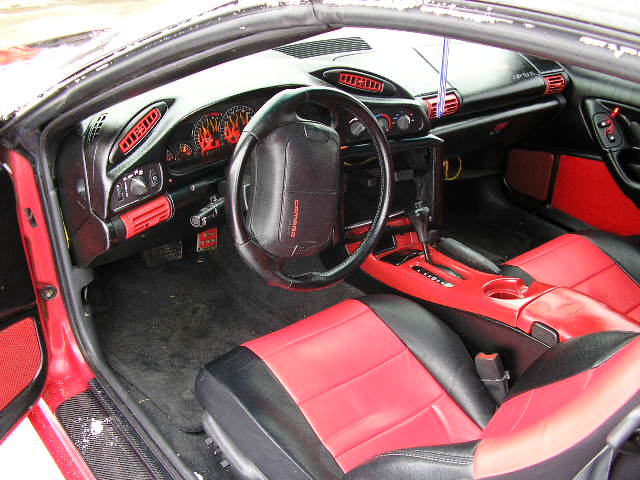
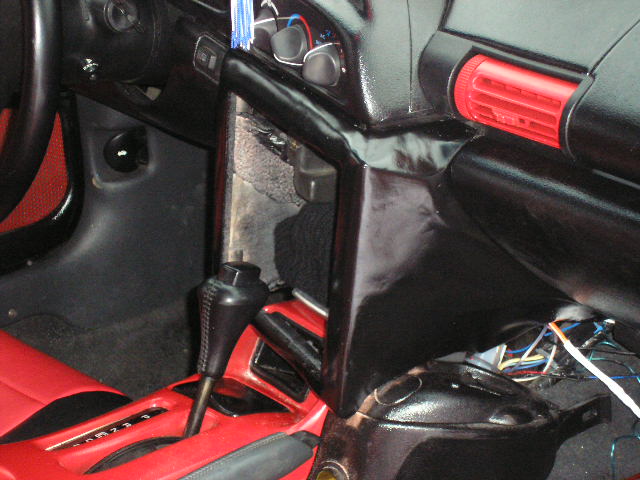
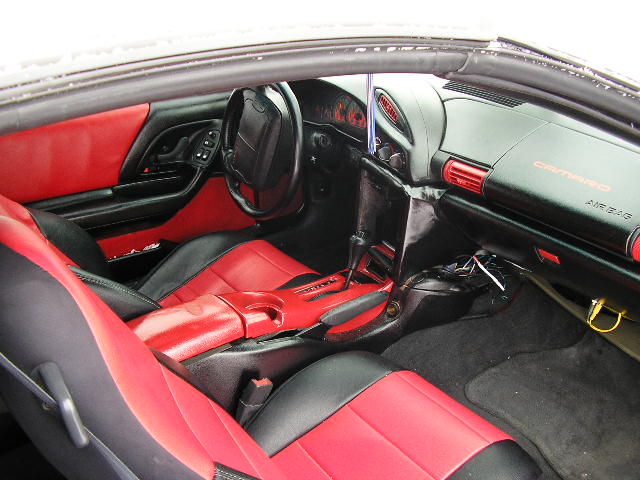
First fiberglass project I've ever done, but the light makes it look more wavy than it really is.
First fiberglass project I've ever done, but the light makes it look more wavy than it really is.
Originally Posted by Toonz
The best job I've EVER seen on this....

My little bro's (NA$TY-TA) first TA... it was
My little bro's (NA$TY-TA) first TA... it was
For some reason the link my Bro used for my pics is dead so here it is linked from my site.......

Kyle

that looks sick. altho im not big on taking out my air bag. but the screen looks great. itd be sick to have a car fully operated via touch screen. more or less. like somehow configuring it to control the hvac controls. altho i have no idea if thats even possible.
Originally Posted by SaintNJ
that looks sick. altho im not big on taking out my air bag. but the screen looks great. itd be sick to have a car fully operated via touch screen. more or less. like somehow configuring it to control the hvac controls. altho i have no idea if thats even possible.
we used a little bit of Fiberglass

Kyle