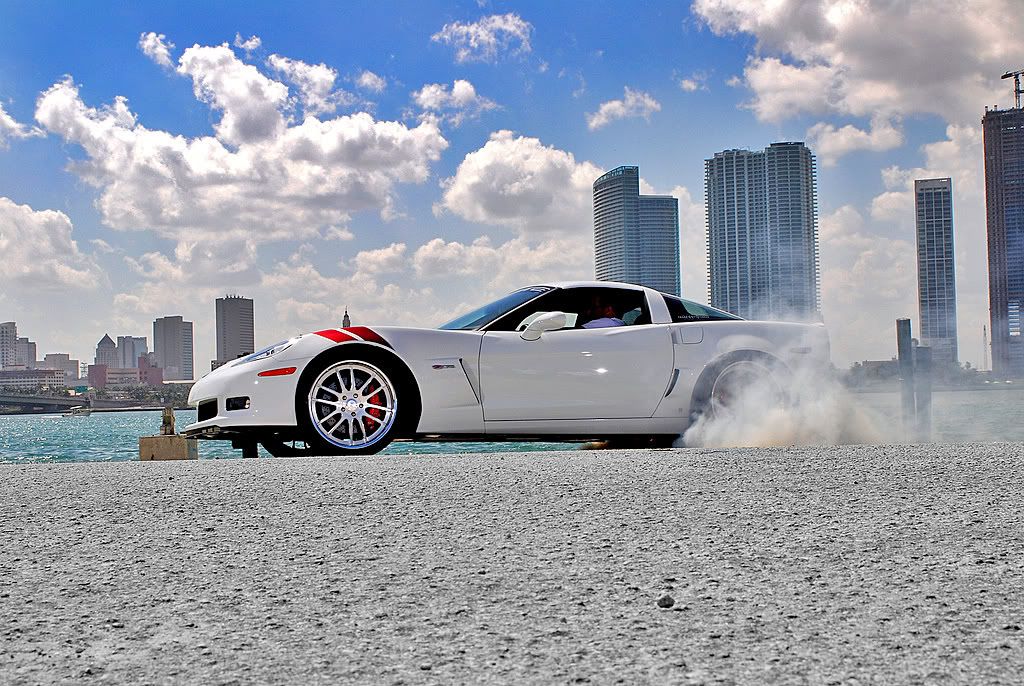


My first attempt at making an HDR image.
 My first attempt at making an HDR image.
 I am pretty sure I snagged this picture off of this site, so whoever took it thanks. I tried going for a cleaner look than some of the more radical ones I've seen on here. I took one image, then made three separate ones adjusting the exposure, gamma, adding shadows and highlights, etc. Then I screwed around with the white threshold a bit to get some of the different effects. Lemme know what ya think.
STOCK PHOTO
HDR IMAGES


STOCK PHOTO
HDR IMAGES
I like the first one the best (first HDR rendering)
Can you tell me what program you used to do these? I just purchased a Nikon D40, and would love to take some shots to turn into HDR images.
Can you tell me what program you used to do these? I just purchased a Nikon D40, and would love to take some shots to turn into HDR images.
I can't believe you honestly put Halo's on your car, are TTIIs next? Sweet HIDs too are they 10000k like every other ricer has? Way to ruin a nice turbo car



Trending Topics
LS1 Tech Stories
The Best V8 Stories One Small Block at Time

Gas Monkey Built a 6-Wheel Ferrari Testarossa With a Corvette LT4 Engine
Verdad Gallardo
7 Most Reliable High-Performance Engines GM Has Ever Built
Verdad Gallardo
Amazing '71 Camaro Restomod Is Modern Muscle Car Under the Skin
Verdad Gallardo
6 Common C5 Corvette Failures and What's Involved In Repairing Them
Pouria Savadkouei
Retro Modern Bandit Pontiac Trans AM Comes With Burt Reynolds' Autograph
Verdad Gallardo
Top 10 Greatest Cadillac V Series Performance Models Ever, Ranked
Pouria Savadkouei
Top 10 Most Powerful Chevy Trucks Ever Made!

Hennessey's New Supercharged Silverado ZR2 Has 700 HP
Verdad Gallardo
Coachbuilt N2A Anteros Is an LS2-Powered C6 Corvette In Italian Clothes
Verdad Gallardo

TECH Apprentice
iTrader: (2)
Joined: Aug 2006
Posts: 310
Likes: 0
From: OKC, OK & Hatteras Island, NC
As stated I am sorry to be an *** about it, but IMO you did not attempt anything.
If you want to do HDR photography, here is what you do. Learn what HDR is, learn how to do, and then go and try it. You did not even take the picture yourself. People see HDR in the title and think you posted examples of a few HDR images... You did not.
Sorry you dont like my headlights. Cheap shot from a guy with a busted trans am, and is proud of a 14sec civic .
.
If you want to do HDR photography, here is what you do. Learn what HDR is, learn how to do, and then go and try it. You did not even take the picture yourself. People see HDR in the title and think you posted examples of a few HDR images... You did not.
Sorry you dont like my headlights. Cheap shot from a guy with a busted trans am, and is proud of a 14sec civic
. 


Yeah you can't just take an ordinary photo and pretend to make it HDR...
Unless you have the RAW file there is no way you are making an HDR from a single picture, especially just a random picture.
And I don't know jack **** about HDR!
Unless you have the RAW file there is no way you are making an HDR from a single picture, especially just a random picture.
And I don't know jack **** about HDR!
TECH Regular
Joined: Sep 2008
Posts: 439
Likes: 0
From: Edison, New Jersey
what a *******!

dude it was his first try at HDR chill the **** out...dont be such a *****...instead offer constructive criticism...i would love to see some of your HDR pics hahaha



On The Tree
Joined: Aug 2007
Posts: 148
Likes: 0
From: Warren, OH
As stated I am sorry to be an *** about it, but IMO you did not attempt anything.
If you want to do HDR photography, here is what you do. Learn what HDR is, learn how to do, and then go and try it. You did not even take the picture yourself. People see HDR in the title and think you posted examples of a few HDR images... You did not.
Sorry you dont like my headlights. Cheap shot from a guy with a busted trans am, and is proud of a 14sec civic.
If you want to do HDR photography, here is what you do. Learn what HDR is, learn how to do, and then go and try it. You did not even take the picture yourself. People see HDR in the title and think you posted examples of a few HDR images... You did not.
Sorry you dont like my headlights. Cheap shot from a guy with a busted trans am, and is proud of a 14sec civic
.OP- You're not allowed to get pissy if you don't even know what you're trying to do or what that you're trying to do is.
Want another cheap shot? My sub $1700 DSM will maul your hondur
Don't be an *** and lighten up a little.




HDR allows for more well....dynamic Range, not depth of field.
Oh an DirtyBird222, Your original image has more dynamic range than your HDR attempts anyway. Looks like you used some fill flash anyway which really helped light up the side of the car.
Here's all I'd do. A little change in brightness and shadow/highlights adjustments in photoshop. And some slight sharpening. Nothing else is really needed here.