




2000 ws6 headlight issues!! the usual fixes wont work!
 2000 ws6 headlight issues!! the usual fixes wont work!
 I recently bought my first f-body a 2000 ws6 t/a. Since I had it the headlights have not worked properly. At first I thought that (re)connecting the wiring harness to the motors and replacing the gears would fix it. Tried that same thing. Replaced the headlight module TWICE! Didn't help then one side would go up and not the other checked all connections and they are good fuses are good too. Replaced drl module and still the same except now on low beam all.four lights come on with a brownish glow they're not burned out though I checked. Then on high beam one side (same side that goes up and down) will work correctly. Now I've pulled the bcm out to check it out. Can someone please help??!! Im going insane thanks in advance!

sounds like a ground issue more than anything or a possible short. might try to trace the wires and look for a place they might of gotten melted or something.
also have you tried replacing the actual headlight switch?
also have you tried replacing the actual headlight switch?
That I haven't tried but as far as headlights coming on they come on just not with the correct amperage I think
Mine were working fine until I unplugged them to do a gear swap - and then this stuff started happening. I had to take the male terminals out of the connector body and polish them with steel wool and also had to replace some female terminals that were too far gone. Once I cleaned them up - all has been perfect.
Trending Topics
That may be but if both circuits are good going into the motor. Wouldn't it mean that it's not receiving power from the source? It could be ground but it could also be that its not getting the correct signal. Then the bcm is too blame because all the other modules are good.
LS1 Tech Stories
The Best V8 Stories One Small Block at Time

Gas Monkey Built a 6-Wheel Ferrari Testarossa With a Corvette LT4 Engine
Verdad Gallardo
7 Most Reliable High-Performance Engines GM Has Ever Built
Verdad Gallardo
Amazing '71 Camaro Restomod Is Modern Muscle Car Under the Skin
Verdad Gallardo
6 Common C5 Corvette Failures and What's Involved In Repairing Them
Pouria Savadkouei
Retro Modern Bandit Pontiac Trans AM Comes With Burt Reynolds' Autograph
Verdad Gallardo
Top 10 Greatest Cadillac V Series Performance Models Ever, Ranked
Pouria Savadkouei
Top 10 Most Powerful Chevy Trucks Ever Made!

Hennessey's New Supercharged Silverado ZR2 Has 700 HP
Verdad Gallardo
Coachbuilt N2A Anteros Is an LS2-Powered C6 Corvette In Italian Clothes
Verdad Gallardo That may be but if both circuits are good going into the motor. Wouldn't it mean that it's not receiving power from the source? It could be ground but it could also be that its not getting the correct signal. Then the bcm is too blame because all the other modules are good.


Joined: Nov 2003
Posts: 11,331
Likes: 346
From: Jacksonville, FL (originally from Toronto Canada)
That may be but if both circuits are good going into the motor. Wouldn't it mean that it's not receiving power from the source? It could be ground but it could also be that its not getting the correct signal. Then the bcm is too blame because all the other modules are good.
Normally when you have multiple bulbs that illuminate improperly (tail lights, head lights, or whatever) it is because of a bad ground. What happens is that the power to one bulb ends up grounding through the other so both illuminate rather dimly.
The headlight doors and the headlight bulbs are also completely separate except that they are controlled by the same switch. However, the headlamp door control module shares a ground point with the left headlights so that's the first place I'd look.
You can forget about the BCM - it has nothing to do with the headlights in any way.
Normally when you have multiple bulbs that illuminate improperly (tail lights, head lights, or whatever) it is because of a bad ground. What happens is that the power to one bulb ends up grounding through the other so both illuminate rather dimly.
The headlight doors and the headlight bulbs are also completely separate except that they are controlled by the same switch. However, the headlamp door control module shares a ground point with the left headlights so that's the first place I'd look.
Normally when you have multiple bulbs that illuminate improperly (tail lights, head lights, or whatever) it is because of a bad ground. What happens is that the power to one bulb ends up grounding through the other so both illuminate rather dimly.
The headlight doors and the headlight bulbs are also completely separate except that they are controlled by the same switch. However, the headlamp door control module shares a ground point with the left headlights so that's the first place I'd look.
Its only one side that's jacked up, right? If so, I'll be the problem is in the headlight door motor connector. (All the door motor wires and bulb wires go through that connection.) Got to unplug it and check it out. You can test the ground continuity at that point, etc.
Its only one side that's jacked up, right? If so, I'll be the problem is in the headlight door motor connector. (All the door motor wires and bulb wires go through that connection.) Got to unplug it and check it out. You can test the ground continuity at that point, etc.
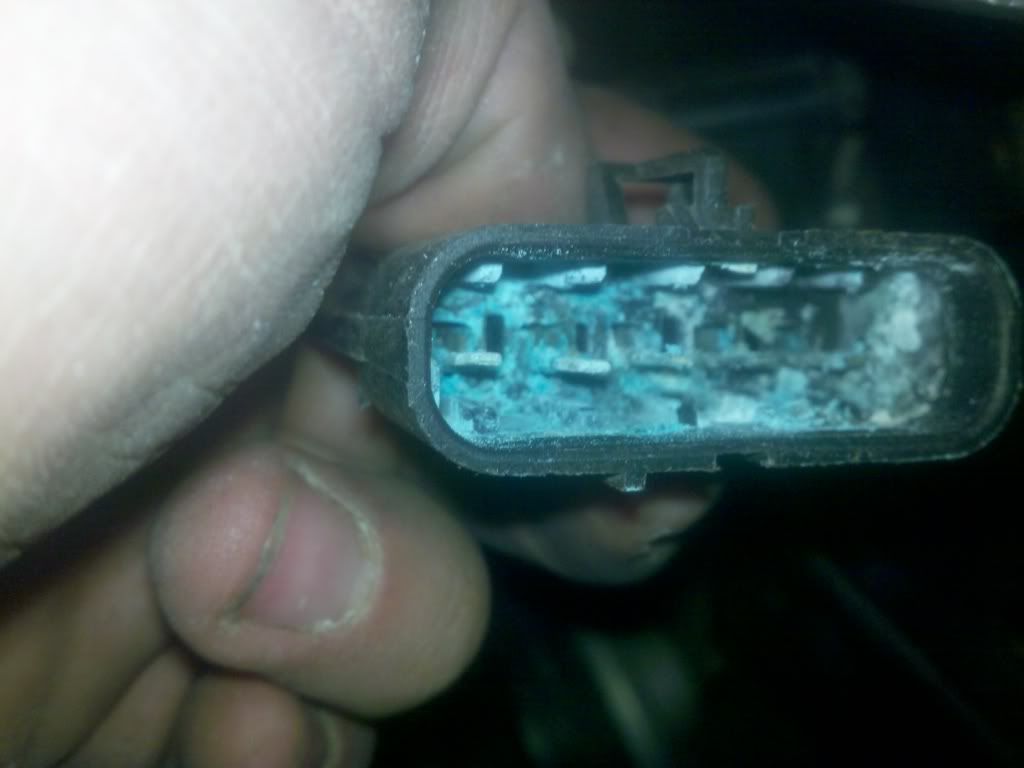
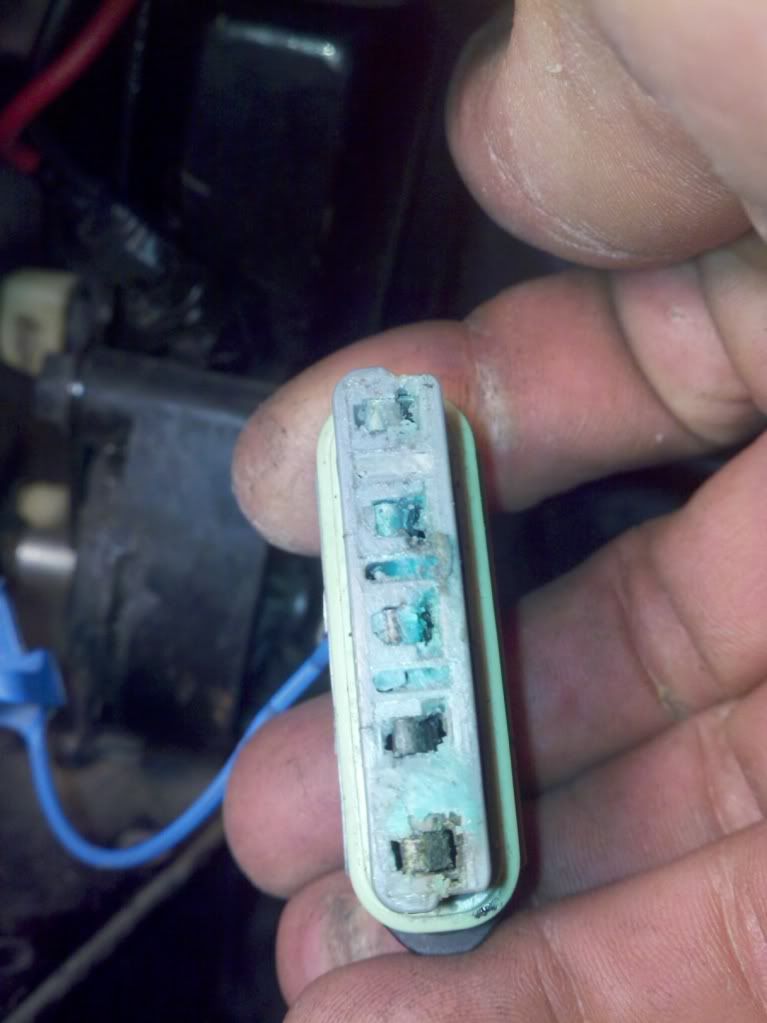
Yea... that's ugly. I had one like that and was able to remove the terminals from the connector body and polish them up a bit. Getting the corrosion off the plastic may require a bath in something. If you are adventurous and want to rebuild the connectors, crimp on new terminals, etc. I can assist with part number references.


One of those connectors is going to stay in the car. You need to get rid of all that blue and white junk. Will the male connector stay in the car? (I don't remember.) If so, that one is really easy to clean up.