


EEHack 4.0 Release


Thread Starter
Launching!
Joined: Aug 2013
Posts: 205
Likes: 6
 EEHack 4.0 Release
 http://fbodytech.com/eehack-4-0-released/
The new version of EEHack is (probably) stable enough to use!
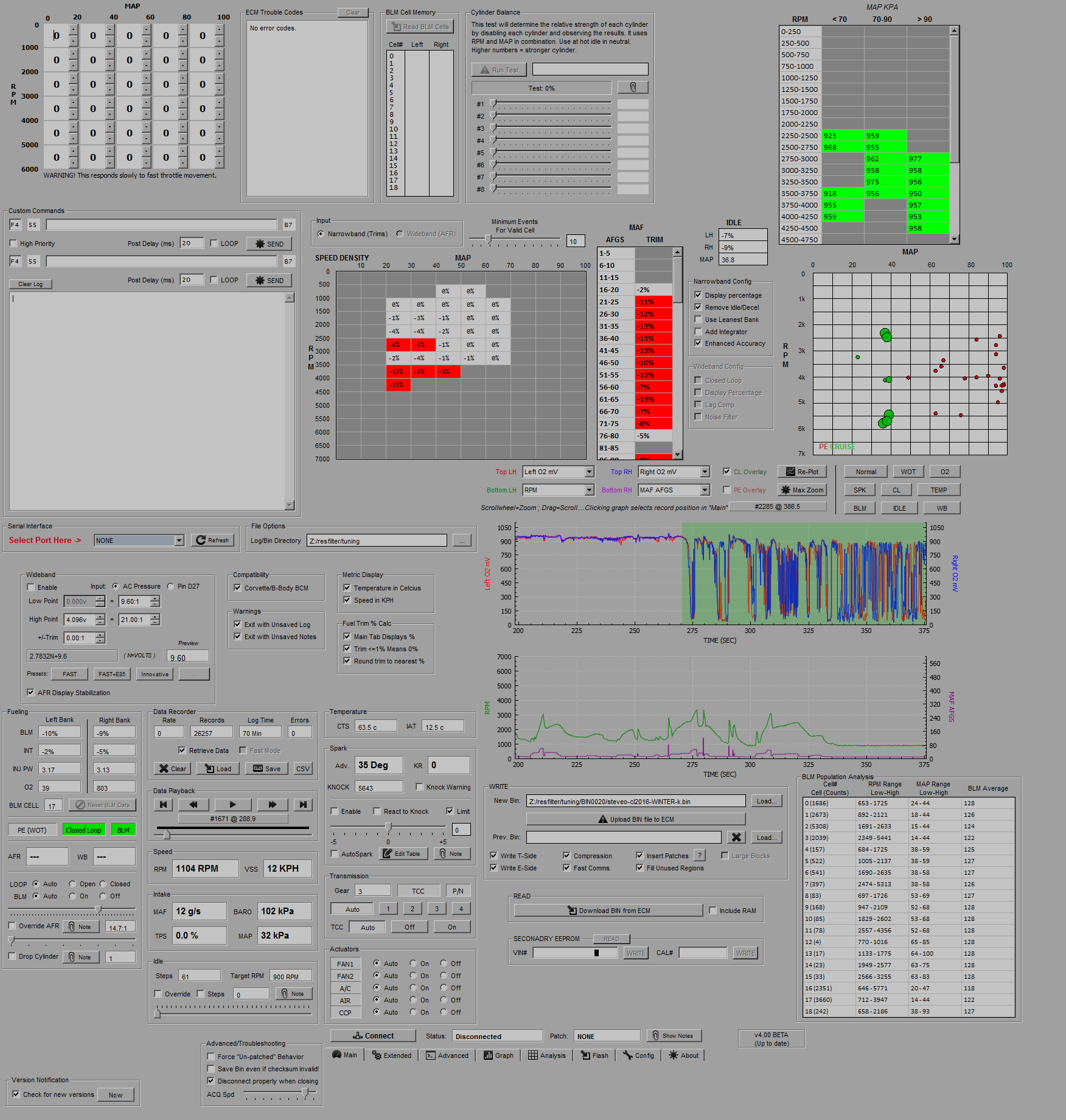
It records, modifies, tunes, analyzes, graphs, and flashes your LT1 in almost every conceivable way to help you nail the perfect tune more quickly.
This thing is now a monster with many tens of thousands of lines of code, and exponentially more features than any LT1 datalogging utility on the market, for free.
I worked hard on this one.here's a full 4.0 feature list....
Data Acquisition and Playback (From ECM)
Displays only engine parameters useful for advanced tuning. No air conditioning or traction control junk, just fuel, spark, air, idle, etc.
Full-time data recording — If you’re connected, you’re logging.
Save data to disk in raw format or CSV export
Optionally load multiple logs into the buffer for playback and analysis
Accelerated acquisition mode with increased acq rate available (requires patch)
Displays DTC error codes with both numbers and descriptions
Open loop AFR target display (requires patch)
Wideband O2 linear input from AC or Pin D27 with simplified two-point arbitrary configuration, presets, and optional smoothing
Read entire BLM cell memory set directly from ECM
Display BLM/INT as RAW or as percentage with optional precision and round-to-zero
Visual knock warning (flashes the screen bright red)
Real-time parameters (To ECM)
Skews timing advance in real-time as addition/subtraction from programmed value on a slider, with a 5 degree safety switch
Automatically modify timing per-region with a 3×3 map/rpm “Autospark” table
Optional knock-reactive routine, removes timing advance permanently on knock for safety
Disable arbitrary injectors per-cylinder to test cylinder strength, available automated cylinder strength test with bar graphs
Override AFR target to try custom air fuel ratios on the fly
Override idle target RPM or move IAC stepper motor directly
Force closed/open loop
Force BLM learn enable/disable
Force fans, A/C compressor, AIR pump enable/disable
Force gear selection and TCC lock/unlock
Clear DTC error codes
Reset BLM cell data
Onboard notepad with snapshot buttons to note the conditions when you’ve found ideal values
Custom command insertion with automatic checksum and length calculation, single-shot or loop mode
Data Graphing
Graphs four parameters with twin synchronized time-domain anti-aliased plotters
Drag/mousewheel for move/zoom control
Click graph to jump to display record
Optionally mark closed loop and WOT sections with a colored transparent overlay
Preset buttons for common data set combinations
EEPROM Programming (Bin Write/Read)
Selective E-side and T-side write (potential 50% reduction in flash time) with automatic previous bin comparison
Flash write compression with up to 8% reduction in flash time
Passive ‘eehack improving’ code insertion (optional) which enables advanced features like open loop AFR and faster log rates
Unique ‘failed flash’ recovery routine attempts to retry and save your ECM instead of bricking it if something goes wrong.
Bin READ with optional RAM section omission (10% faster bin read)
Read and set any 17 char string as your VIN number or calibration ID instantly with a single click
Static Data Analysis Module
Very fast “One-click” analyzer has sane default settings, and rarely requires configuration
Cell-based ‘real average’ closed loop trim analyzer will analyze BLMs in MAF and VE scope
Cell-based ‘open loop in wideband’ analyzer will analyze average AFR or percentage of error (if patch applied) in MAF and VE scope
Separate idle AFR analysis
Power enrichment AFR analysis with Wideband
Knock scatter chart shows per-event knock magnitude, location, and power enrichment status
O2 performance (min, max, cross count) analyzer
BLM cell population and range analyzer
Miscellaneous
Passive ‘new version’ notification (Optional)
Optional debug logging in separate window
Metric/imperial units switch for temperature and speed
Manually specify your log and bin storage directory, and all of your save/load dialogs will start there
This thing clobbers commercial LT1 dataloggers now, if you use the ‘donate’ button in the about tab and throw me a few bucks, I’d appreciate it a lot!
The new version of EEHack is (probably) stable enough to use!
It records, modifies, tunes, analyzes, graphs, and flashes your LT1 in almost every conceivable way to help you nail the perfect tune more quickly.
This thing is now a monster with many tens of thousands of lines of code, and exponentially more features than any LT1 datalogging utility on the market, for free.
I worked hard on this one.here's a full 4.0 feature list....
Data Acquisition and Playback (From ECM)
Displays only engine parameters useful for advanced tuning. No air conditioning or traction control junk, just fuel, spark, air, idle, etc.
Full-time data recording — If you’re connected, you’re logging.
Save data to disk in raw format or CSV export
Optionally load multiple logs into the buffer for playback and analysis
Accelerated acquisition mode with increased acq rate available (requires patch)
Displays DTC error codes with both numbers and descriptions
Open loop AFR target display (requires patch)
Wideband O2 linear input from AC or Pin D27 with simplified two-point arbitrary configuration, presets, and optional smoothing
Read entire BLM cell memory set directly from ECM
Display BLM/INT as RAW or as percentage with optional precision and round-to-zero
Visual knock warning (flashes the screen bright red)
Real-time parameters (To ECM)
Skews timing advance in real-time as addition/subtraction from programmed value on a slider, with a 5 degree safety switch
Automatically modify timing per-region with a 3×3 map/rpm “Autospark” table
Optional knock-reactive routine, removes timing advance permanently on knock for safety
Disable arbitrary injectors per-cylinder to test cylinder strength, available automated cylinder strength test with bar graphs
Override AFR target to try custom air fuel ratios on the fly
Override idle target RPM or move IAC stepper motor directly
Force closed/open loop
Force BLM learn enable/disable
Force fans, A/C compressor, AIR pump enable/disable
Force gear selection and TCC lock/unlock
Clear DTC error codes
Reset BLM cell data
Onboard notepad with snapshot buttons to note the conditions when you’ve found ideal values
Custom command insertion with automatic checksum and length calculation, single-shot or loop mode
Data Graphing
Graphs four parameters with twin synchronized time-domain anti-aliased plotters
Drag/mousewheel for move/zoom control
Click graph to jump to display record
Optionally mark closed loop and WOT sections with a colored transparent overlay
Preset buttons for common data set combinations
EEPROM Programming (Bin Write/Read)
Selective E-side and T-side write (potential 50% reduction in flash time) with automatic previous bin comparison
Flash write compression with up to 8% reduction in flash time
Passive ‘eehack improving’ code insertion (optional) which enables advanced features like open loop AFR and faster log rates
Unique ‘failed flash’ recovery routine attempts to retry and save your ECM instead of bricking it if something goes wrong.
Bin READ with optional RAM section omission (10% faster bin read)
Read and set any 17 char string as your VIN number or calibration ID instantly with a single click
Static Data Analysis Module
Very fast “One-click” analyzer has sane default settings, and rarely requires configuration
Cell-based ‘real average’ closed loop trim analyzer will analyze BLMs in MAF and VE scope
Cell-based ‘open loop in wideband’ analyzer will analyze average AFR or percentage of error (if patch applied) in MAF and VE scope
Separate idle AFR analysis
Power enrichment AFR analysis with Wideband
Knock scatter chart shows per-event knock magnitude, location, and power enrichment status
O2 performance (min, max, cross count) analyzer
BLM cell population and range analyzer
Miscellaneous
Passive ‘new version’ notification (Optional)
Optional debug logging in separate window
Metric/imperial units switch for temperature and speed
Manually specify your log and bin storage directory, and all of your save/load dialogs will start there
This thing clobbers commercial LT1 dataloggers now, if you use the ‘donate’ button in the about tab and throw me a few bucks, I’d appreciate it a lot!
Last edited by steveo_; Dec 31, 2015 at 12:52 PM. Reason: replaced with full feature list

Thread Starter
Launching!
Joined: Aug 2013
Posts: 205
Likes: 6
it doesn't edit the bin. that's what my EEX definition + tunerpro (free) are for.
but it does let you TEST certain tuning things, the most useful being the ability to add or remove timing advance in real-time while driving.

Thread Starter
Launching!
Joined: Aug 2013
Posts: 205
Likes: 6
Any chance of support for us poor OBD2 SOB's in the future?
when i started this project i'd already made a study of OBD-I aldl communications and written software for them, with OBD-II i feel i'd be almost starting over from scratch.
the chances of me coming up with an OBD-II flash tool are almost zero, but again, if i had the ecm and someone could provide me a concise serial dump of a GM tool's programming routine (as well as a copy of the bin being programmed) i could reverse engineer that and MAYBE get it working. that's a long shot, though.
i started to support OBD-I V6 cars and ran out of steam too, since not a lot of people seemed too enthusiastic about it, and every damn feature I added required 3rd party testing, since i don't have an ECM to test with.


Awesome i can't wait for spring to get here to try this out.
Can you add or take away from the VE table's in real time to play with the fueling? Or better question is can you manipulate fueling in any way real time?
Can you add or take away from the VE table's in real time to play with the fueling? Or better question is can you manipulate fueling in any way real time?
Trending Topics
12 Second Club
Joined: Feb 2012
Posts: 419
Likes: 4
From: Long Beach, MS
It is definitely an awesome tool, If you have an OBDI LT1, this is THE tool to use. Excellent logging, analysis, and flashing all in one program.
Steve has done a great job with it. Also the wideband abilities are superb.
See lower left, override afr.

Thread Starter
Launching!
Joined: Aug 2013
Posts: 205
Likes: 6
yes you can set a static AFR target, which helps, but doesn't override power enrichment afaik, the AFR setting can be a bit sketchy, so i'm working on better options for that in future versions.
the way GM wrote that particular development feature is a bit odd, it actually adds trim, but it doesn't disable block learn mode, so it just ends up trimming it out. so what eehack has to do is lock out closed loop and BLM control, and reset all your BLM cells when that feature is enabled.
it's great for finding the smoothest and cleanest idle AFR, though!
my first focus was a really good analysis suite. the things eehack does with your AFR data (especially against large data sets) helps you nail your AFR targets very quickly with this program, so real-time fuel tuning isn't first on my list right now.. also modifying your VE table only requires flashing HALF your ecm, so at least making VE changes and testing them doesn't take as long as it used to.


Thread Starter
Launching!
Joined: Aug 2013
Posts: 205
Likes: 6
what do you want, a bigger timing table?
ive never really found it a limitation when tuning boost for other people;
how many more map columns would it take to make you happy?
Thread Starter
Launching!
Joined: Aug 2013
Posts: 205
Likes: 6
id just like to see same resolution but having a 100-200 kpa table for timing and ve table.
Thread Starter
Launching!
Joined: Aug 2013
Posts: 205
Likes: 6
EEHack’s 4.1 release is now out!
For those of you running 4.0, hopefully the automatic version notification worked, and this notice won’t even be necessary…
Highlights include improvements to the graphing module, the knock analyzer module, and some minor tune-ups to flash write timing to decrease the chance that errors will occur.
This release is also important as I’ve changed the way font sizes are displayed. Some users with modern high dpi displays with enlarged fonts found the program unusable. This should help a lot.
See release announcement for download link: http://fbodytech.com/eehack-4-1-released/
For those of you running 4.0, hopefully the automatic version notification worked, and this notice won’t even be necessary…
Highlights include improvements to the graphing module, the knock analyzer module, and some minor tune-ups to flash write timing to decrease the chance that errors will occur.
This release is also important as I’ve changed the way font sizes are displayed. Some users with modern high dpi displays with enlarged fonts found the program unusable. This should help a lot.
See release announcement for download link: http://fbodytech.com/eehack-4-1-released/
Thread Starter
Launching!
Joined: Aug 2013
Posts: 205
Likes: 6
TECH Addict
Joined: Dec 2010
Posts: 2,610
Likes: 4
From: Maricopa, AZ
4.2 is out, download here: http://fbodytech.com/eehack-2/download-eehack/

Glad your still adding updates. I downloaded the 4.2 beta and it worked great for me. I flashed two .bins with it so far. I had problems with 4.1 not showing closed loop and other stuff. 4.2 worked great though. I'm still new to all this but It's pretty cool stuff and easy to use. I've been able to send Solomon stuff to get my tune dialed in more.

Thread Starter
Launching!
Joined: Aug 2013
Posts: 205
Likes: 6
nothing wrong with tunercat but try tunerpro with my definition file. it's on my site. The parameters are categorized and documented in a way that will probably make tuning a lot easier for you..