


MS excel data logger for timeslips


 MS excel data logger for timeslips
 I wrote up a little spreadsheet to help log your timeslips.
It will automatically graph your runs and a few other neat tricks.
Take a look. Please provide feedback for enhancements or errors.
I'd love to automate a DA calculation but I can't find much on how to calculate DA. Can anyone point me to some info?
It will automatically graph your runs and a few other neat tricks.
Take a look. Please provide feedback for enhancements or errors.
I'd love to automate a DA calculation but I can't find much on how to calculate DA. Can anyone point me to some info?
Last edited by radkon; Apr 18, 2007 at 01:15 PM.
6 & 8 Second Club
Joined: Aug 2006
Posts: 2,284
Likes: 0
From: Illinois, RT 66 dragway area
I have a little basic spreadsheet that all my friends seem to like, but I don't know how to post so u can compare and use.
Link- http://nhra.com/tech_specs/altitude.html
NHRA ALTITUDE CORRECTION FACTORS
Comp, S/C, S/G, S/ST
Convert to Sea Level Convert to Altitude
Track Name Alt ET MPH 1/2ET 1/2MPH ET MPH 1/2ET 1/2MPH
DIVISION 4
Amarillo, TX 3700 .9646 1.0337 .9823 1.0168 1.0367 .9674 1.0180 .9834
Roswell, NM 3700 .9646 1.0337 .9823 1.0168 1.0367 .9674 1.0180 .9834
DIVISION 5
Denver, CO 5800 .9405 1.0563 .9702 1.0281 1.0633 .9467 1.0307 .9726
Douglas, WY 4900 .9508 1.0466 .9754 1.0233 1.0517 .9555 1.0252 .9772
Grand Junction, CO 4800 .9520 1.0455 .9760 1.0228 1.0504 .9565 1.0246 .9777
Great Bend, KS 1900 .9853 1.0143 .9927 1.0072 1.0149 .9859 1.0074 .9929
Julesburg, CO 3500 .9669 1.0315 .9835 1.0158 1.0342 .9694 1.0168 .9845
Pierre, S.D. 1700 .9876 1.0122 .9938 1.0061 1.0126 .9880 1.0062 .9940
Pueblo, CO 4900 .9508 1.0466 .9754 1.0233 1.0517 .9555 1.0252 .9772
DIVISION 6
Acton, MT 3700 .9646 1.0337 .9823 1.0168 1.0367 .9674 1.0180 .9834
Anaconda, MT 5100 .9485 1.0488 .9743 1.0244 1.0543 .9535 1.0264 .9762
Ashcroft, CAN 1700 .9876 1.0122 .9938 1.0061 1.0126 .9880 1.0062 .9940
Boise, ID 2700 .9761 1.0229 .9881 1.0115 1.0245 .9776 1.0121 .9887
Lewistown, MT 4100 .9600 1.0380 .9800 1.0190 1.0416 .9634 1.0204 .9814
Medicine Hat, CAN 2400 .9796 1.0197 .9898 1.0098 1.0209 .9807 1.0103 .9903
Prince George, BC 2200 .9819 1.0175 .9909 1.0088 1.0185 .9828 1.0092 .9913
Saskatoon, CAN 1600 .9888 1.0111 .9944 1.0055 1.0114 .9890 1.0057 .9945
DIVISION 7
Albuquerque, NM 5400 .9451 1.0520 .9725 1.0260 1.0581 .9506 1.0282 .9747
Fallon, NV 4000 .9612 1.0369 .9806 1.0185 1.0404 .9644 1.0198 .9819
Inyokern, CA 2400 .9796 1.0197 .9898 1.0098 1.0209 .9807 1.0103 .9903
Las Vegas, NV 2100 .9830 1.0165 .9915 1.0082 1.0173 .9838 1.0086 .9918
Palmdale, CA 2700 .9761 1.0229 .9881 1.0115 1.0245 .9776 1.0121 .9887
Salt Lake, UT 4400 .9566 1.0412 .9783 1.0206 1.0454 .9604 1.0222 .9798
Tucson, AZ 3000 .9727 1.0262 .9863 1.0131 1.0281 .9745 1.0139 .9871
NOTE: Supercharged and/or turbocharged cars (i.e.: AA/A, AA/AT, BB/A, BB/AT, A/PM and AA/PM) use half factor; TA/D and TA/FC cars are not factored.
NHRA ALTITUDE CORRECTION FACTORS
Stock & Super Stock
Convert to Sea Level Convert to Altitude
Track Name Alt ET MPH ET MPH
DIVISION 4
Amarillo, TX 3700 .9549 1.0479 1.0472 .9543
Roswell, NM 3700 .9549 1.0479 1.0472 .9543
DIVISION 5
Denver, CO 5800 .9276 1.0773 1.0781 .9282
Douglas, WY 4900 .9393 1.0647 1.0646 .9392
Grand Junction, CO 4800 .9406 1.0633 1.0632 .9405
Great Bend, KS 1900 .9783 1.0227 1.0222 .9778
Julesburg, CO 3500 .9575 1.0451 1.0444 .9568
Pierre, S.D. 1700 .9809 1.0199 1.0195 .9805
Pueblo, CO 4900 .9393 1.0647 1.0646 .9392
DIVISION 6
Acton, MT 3700 .9549 1.0479 1.0472 .9543
Anaconda, MT 5100 .9367 1.0675 1.0676 .9368
Ashcroft, CAN 1700 .9809 1.0199 1.0195 .9805
Boise, ID 2700 .9679 1.0339 1.0332 .9672
Lewistown, MT 4100 .9497 1.0535 1.0530 .9492
Medicine Hat, CAN 2400 .9718 1.0297 1.0290 .9712
Prince George, BC 2200 .9744 1.0269 1.0263 .9738
Saskatoon, CAN 1600 .9822 1.0185 1.0181 .9818
DIVISION 7
Albuquerque 5400 .9328 1.0717 1.0720 .9331
Fallon, NV 4000 .9510 1.0521 1.0515 .9505
Inyokern, CA 2400 .9718 1.0297 1.0290 .9712
Las Vegas, NV 2100 .9757 1.0255 1.0249 .9751
Palmdale, CA 2700 .9679 1.0339 1.0332 .9672
Salt Lake, UT 4400 .9458 1.0577 1.0573 .9454
Tucson, AZ 3000 .9640 1.0381 1.0373 .9633
Link- http://nhra.com/tech_specs/altitude.html
NHRA ALTITUDE CORRECTION FACTORS
Comp, S/C, S/G, S/ST
Convert to Sea Level Convert to Altitude
Track Name Alt ET MPH 1/2ET 1/2MPH ET MPH 1/2ET 1/2MPH
DIVISION 4
Amarillo, TX 3700 .9646 1.0337 .9823 1.0168 1.0367 .9674 1.0180 .9834
Roswell, NM 3700 .9646 1.0337 .9823 1.0168 1.0367 .9674 1.0180 .9834
DIVISION 5
Denver, CO 5800 .9405 1.0563 .9702 1.0281 1.0633 .9467 1.0307 .9726
Douglas, WY 4900 .9508 1.0466 .9754 1.0233 1.0517 .9555 1.0252 .9772
Grand Junction, CO 4800 .9520 1.0455 .9760 1.0228 1.0504 .9565 1.0246 .9777
Great Bend, KS 1900 .9853 1.0143 .9927 1.0072 1.0149 .9859 1.0074 .9929
Julesburg, CO 3500 .9669 1.0315 .9835 1.0158 1.0342 .9694 1.0168 .9845
Pierre, S.D. 1700 .9876 1.0122 .9938 1.0061 1.0126 .9880 1.0062 .9940
Pueblo, CO 4900 .9508 1.0466 .9754 1.0233 1.0517 .9555 1.0252 .9772
DIVISION 6
Acton, MT 3700 .9646 1.0337 .9823 1.0168 1.0367 .9674 1.0180 .9834
Anaconda, MT 5100 .9485 1.0488 .9743 1.0244 1.0543 .9535 1.0264 .9762
Ashcroft, CAN 1700 .9876 1.0122 .9938 1.0061 1.0126 .9880 1.0062 .9940
Boise, ID 2700 .9761 1.0229 .9881 1.0115 1.0245 .9776 1.0121 .9887
Lewistown, MT 4100 .9600 1.0380 .9800 1.0190 1.0416 .9634 1.0204 .9814
Medicine Hat, CAN 2400 .9796 1.0197 .9898 1.0098 1.0209 .9807 1.0103 .9903
Prince George, BC 2200 .9819 1.0175 .9909 1.0088 1.0185 .9828 1.0092 .9913
Saskatoon, CAN 1600 .9888 1.0111 .9944 1.0055 1.0114 .9890 1.0057 .9945
DIVISION 7
Albuquerque, NM 5400 .9451 1.0520 .9725 1.0260 1.0581 .9506 1.0282 .9747
Fallon, NV 4000 .9612 1.0369 .9806 1.0185 1.0404 .9644 1.0198 .9819
Inyokern, CA 2400 .9796 1.0197 .9898 1.0098 1.0209 .9807 1.0103 .9903
Las Vegas, NV 2100 .9830 1.0165 .9915 1.0082 1.0173 .9838 1.0086 .9918
Palmdale, CA 2700 .9761 1.0229 .9881 1.0115 1.0245 .9776 1.0121 .9887
Salt Lake, UT 4400 .9566 1.0412 .9783 1.0206 1.0454 .9604 1.0222 .9798
Tucson, AZ 3000 .9727 1.0262 .9863 1.0131 1.0281 .9745 1.0139 .9871
NOTE: Supercharged and/or turbocharged cars (i.e.: AA/A, AA/AT, BB/A, BB/AT, A/PM and AA/PM) use half factor; TA/D and TA/FC cars are not factored.
NHRA ALTITUDE CORRECTION FACTORS
Stock & Super Stock
Convert to Sea Level Convert to Altitude
Track Name Alt ET MPH ET MPH
DIVISION 4
Amarillo, TX 3700 .9549 1.0479 1.0472 .9543
Roswell, NM 3700 .9549 1.0479 1.0472 .9543
DIVISION 5
Denver, CO 5800 .9276 1.0773 1.0781 .9282
Douglas, WY 4900 .9393 1.0647 1.0646 .9392
Grand Junction, CO 4800 .9406 1.0633 1.0632 .9405
Great Bend, KS 1900 .9783 1.0227 1.0222 .9778
Julesburg, CO 3500 .9575 1.0451 1.0444 .9568
Pierre, S.D. 1700 .9809 1.0199 1.0195 .9805
Pueblo, CO 4900 .9393 1.0647 1.0646 .9392
DIVISION 6
Acton, MT 3700 .9549 1.0479 1.0472 .9543
Anaconda, MT 5100 .9367 1.0675 1.0676 .9368
Ashcroft, CAN 1700 .9809 1.0199 1.0195 .9805
Boise, ID 2700 .9679 1.0339 1.0332 .9672
Lewistown, MT 4100 .9497 1.0535 1.0530 .9492
Medicine Hat, CAN 2400 .9718 1.0297 1.0290 .9712
Prince George, BC 2200 .9744 1.0269 1.0263 .9738
Saskatoon, CAN 1600 .9822 1.0185 1.0181 .9818
DIVISION 7
Albuquerque 5400 .9328 1.0717 1.0720 .9331
Fallon, NV 4000 .9510 1.0521 1.0515 .9505
Inyokern, CA 2400 .9718 1.0297 1.0290 .9712
Las Vegas, NV 2100 .9757 1.0255 1.0249 .9751
Palmdale, CA 2700 .9679 1.0339 1.0332 .9672
Salt Lake, UT 4400 .9458 1.0577 1.0573 .9454
Tucson, AZ 3000 .9640 1.0381 1.0373 .9633

Originally Posted by radkon
I wrote up a little spreadsheet to help log your timeslips.
It will automatically graph your runs and a few other neat tricks.
Take a look. Please provide feedback for enhancements or errors.
I'd love to automate a DA calculation but I can't find much on how to calculate DA. Can anyone point me to some info?
It will automatically graph your runs and a few other neat tricks.
Take a look. Please provide feedback for enhancements or errors.
I'd love to automate a DA calculation but I can't find much on how to calculate DA. Can anyone point me to some info?
I like it man,
I'm gonna try it out this weekend, i'll let you know how it goes!

TECH Resident
Joined: May 2005
Posts: 983
Likes: 0
From: 8000DA Land
This page has some info on DA, i tried to make a DA calculator once.. but got tired of reading.. 
http://wahiduddin.net/calc/density_altitude.htm
http://wahiduddin.net/calc/density_altitude.htm
Originally Posted by Luis Castellanos
This page has some info on DA, i tried to make a DA calculator once.. but got tired of reading..
http://wahiduddin.net/calc/density_altitude.htm
http://wahiduddin.net/calc/density_altitude.htm


Trending Topics
updated yet again this time to:
Conditionally format your best times in green so the best can stand out from the crowd.
Automatically calculate split times between foot markers so you can see where you are loosing or gaining time.
Enjoy!
Conditionally format your best times in green so the best can stand out from the crowd.
Automatically calculate split times between foot markers so you can see where you are loosing or gaining time.
Enjoy!
Last edited by radkon; May 4, 2007 at 11:07 AM.

Made a few updates. Primarily 2
1. there was an error when calculating average and best split times.
2. Added an "overall best and avg" worksheet to track improvements from date to date.
1. there was an error when calculating average and best split times.
2. Added an "overall best and avg" worksheet to track improvements from date to date.
Last edited by radkon; May 9, 2007 at 09:11 AM.

Originally Posted by kickassT/A
i keeps asking me for a password to enter anything....
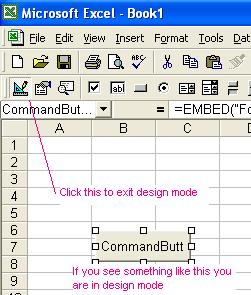
Hit "Alt F11" and you'll be good to go.
What version of Excel are you running? I've tested it on 2000 and XP without issues.
Last edited by radkon; May 11, 2007 at 12:39 PM.

Knocking the dust off this thread...
I downloaded the attached spreadsheet, but can not get it to allow me to input new time sheet. I am running excel 16, so it may be a compatibility issue..
Has this been updated any further?
Can someone point me in the direction of something similar that will work with 2016 excel?
Thanks in advance!
Rick
I downloaded the attached spreadsheet, but can not get it to allow me to input new time sheet. I am running excel 16, so it may be a compatibility issue..
Has this been updated any further?
Can someone point me in the direction of something similar that will work with 2016 excel?
Thanks in advance!
Rick


