










Sneak peek and test software - Lingenfelter nitrous controller

Thread Starter
LS1Tech Sponsor
Joined: Oct 2002
Posts: 603
Likes: 1
From: Decatur, IN
 Sneak peek and test software - Lingenfelter nitrous controller
 We have been working on a new progressive, 2 stage nitrous controller. The new Lingenfelter nitrous control center, NCC-001, will be officially released to the industry at the SEMA show in November with retail sales planned to begin shortly after that.
Here is a link to the interface software. The interface software gives you control of the same functions that are on the device itself as well as save and copy controller setup files. The NCC-001 connects to a PC via a USB interface.
Link to LPE NCC-001 controller software.
The software is saved on our web site as a ZIP file. You need to uncompress the ZIP file and then run the install program. The software is designed to work on PC's running Windows XP or newer Windows operating systems.
We would like to get feedback on the software, features etc. so please post comments on this forum or PM me directly.
I will post some of the details on features and inputs/outputs in a follow up post on this thread. Some features will have to wait until after SEMA though (can't give away all our secrets at once ).
).
Here is a picture of the controller that shows it powered up at the main screen. The wiring connections to/from the device can also be seen on either side of the controller.
Here is a link to the interface software. The interface software gives you control of the same functions that are on the device itself as well as save and copy controller setup files. The NCC-001 connects to a PC via a USB interface.
Link to LPE NCC-001 controller software.
The software is saved on our web site as a ZIP file. You need to uncompress the ZIP file and then run the install program. The software is designed to work on PC's running Windows XP or newer Windows operating systems.
We would like to get feedback on the software, features etc. so please post comments on this forum or PM me directly.
I will post some of the details on features and inputs/outputs in a follow up post on this thread. Some features will have to wait until after SEMA though (can't give away all our secrets at once
).Here is a picture of the controller that shows it powered up at the main screen. The wiring connections to/from the device can also be seen on either side of the controller.
Last edited by Jason Haines @ LPE; Sep 17, 2011 at 01:26 PM. Reason: typo
Having the Maximizer II... here are my thoughts:
Setup
Timer - How does this work? Nothing works until this primary timer has finished counting? Not enough information, I think.
Relay1 / Relay2 - It seems pretty unorganized so I gave up quickly on trying to figure out how it works! lol But it also seems like those two pages could be on a single page.
Overall it seems like the LPE controller will support many more features than my Maximizer II, and offers a higher resolution of customize-ability, so that's a plus.
I think the GUI could use a lot of work, however. Here's what I think: there are some spelling errors; tips inside a box that has to be scrolled is annoying; the "LINGENFELTER" watermark in the graph shouldn't be so pronounced... the company name is already in the window title, I'd like to focus more on the graph itself; the button sizes aren't consistent and many are relatively small compared to the amount of text they; tab order of objects is mostly good, but could be better; along those lines... default / ALT keys, and shortcut keys? Granted they're not necessary, but as an avid keyboard user, I love when programmers put them in; spacing and alignment! When switching between tabs, things "bounce" around and it's kind of aesthetically unappealing. I am glad, however, that whoever designed this made it be sizeable (graphs, that is).
Setup
Options - I like that I can choose + and - for input signals. The Maximizer II only had - inputs. With the lack of labels, I can't figure out what the main timer is in... seconds? milliseconds?
TPS Input - Same as Max II, which I like (voltage, %)
Analog 2 - it's empty ... what might it be?
AFR - completely customizable, which is nice! If I'm not mistaken, the Max II only had a couple to choose from and the only way to customize WB signals was with FJO's wideband controller (which I bought because of that
Hall - I guess it's a MPH based activation, which I TOTALLY wish I had... I might have to try and build a circuit to do this for the Max II (it has extra unused inputs)
Fuel sensor - I love this too! It'd be nice to not rely solely on a wideband singal (I hate the analog FPSS)
Nitrous 1 and Nitrous 2 - I like that you can control two stages, and both the fuel and nitrous solenoids of each, individually.Options - Not sure what the delay is for: the entire stage? Or just the nitrous part of Nitrous1 / Nitrous2? It seems a little redundant in that it should only be on the graph. Again, the MPH is great, RPM is kinda expected now  Customizing the frequencies is nice too! And the fuel advance I assume is to prevent lean spikes... very much needed and with the Max II was only possible if nitrous was one stage 1, and fuel on stage 2 (or vice versa).
Customizing the frequencies is nice too! And the fuel advance I assume is to prevent lean spikes... very much needed and with the Max II was only possible if nitrous was one stage 1, and fuel on stage 2 (or vice versa).Graphs - I like to see my graphs overlaid, so that nitrous and fuel are separate kind of bothers me. I can't figure out what the analog graph is for, and why it's missing on Nitrous2. I also can't figure out how to smooth a graph. I can't imagine having to drag 100 little points one at a time.
Shift Rpm - I never used this feature in the Max II ... it wasn't very accurate since I almost never rode my gears all the way out each time. I'd have to reset the thing constantly, or it'd think I was in 2nd gear vs 3rd or whatever. I'm not sure how LPE would overcome similar problems without reading from the PCM/TCM for autos or some mechanical device for manuals.Timer - How does this work? Nothing works until this primary timer has finished counting? Not enough information, I think.
Relay1 / Relay2 - It seems pretty unorganized so I gave up quickly on trying to figure out how it works! lol But it also seems like those two pages could be on a single page.
Overall it seems like the LPE controller will support many more features than my Maximizer II, and offers a higher resolution of customize-ability, so that's a plus.
I think the GUI could use a lot of work, however. Here's what I think: there are some spelling errors; tips inside a box that has to be scrolled is annoying; the "LINGENFELTER" watermark in the graph shouldn't be so pronounced... the company name is already in the window title, I'd like to focus more on the graph itself; the button sizes aren't consistent and many are relatively small compared to the amount of text they; tab order of objects is mostly good, but could be better; along those lines... default / ALT keys, and shortcut keys? Granted they're not necessary, but as an avid keyboard user, I love when programmers put them in; spacing and alignment! When switching between tabs, things "bounce" around and it's kind of aesthetically unappealing. I am glad, however, that whoever designed this made it be sizeable (graphs, that is).
Thread Starter
LS1Tech Sponsor
Joined: Oct 2002
Posts: 603
Likes: 1
From: Decatur, IN
Updated nitrous controller software to look at We have made significant updates to the nitrous controller software based on some of the input from our beta customers and the feedback on the software on forums like this one. We plan to release the controllers to the public in the next few weeks.
Here is a link to the updated software:
Link to version 2_0_0 of the NCC-001 software
Please look over the software and provide feedback.
Thanks.
Here is a link to the updated software:
Link to version 2_0_0 of the NCC-001 software
Please look over the software and provide feedback.
Thanks.
We have been working on a new progressive, 2 stage nitrous controller. The new Lingenfelter nitrous control center, NCC-001, will be officially released to the industry at the SEMA show in November with retail sales planned to begin shortly after that.
Here is a link to the interface software. The interface software gives you control of the same functions that are on the device itself as well as save and copy controller setup files. The NCC-001 connects to a PC via a USB interface.
Link to LPE NCC-001 controller software.
The software is saved on our web site as a ZIP file. You need to uncompress the ZIP file and then run the install program. The software is designed to work on PC's running Windows XP or newer Windows operating systems.
We would like to get feedback on the software, features etc. so please post comments on this forum or PM me directly.
I will post some of the details on features and inputs/outputs in a follow up post on this thread. Some features will have to wait until after SEMA though (can't give away all our secrets at once).
Here is a picture of the controller that shows it powered up at the main screen. The wiring connections to/from the device can also be seen on either side of the controller.
Here is a link to the interface software. The interface software gives you control of the same functions that are on the device itself as well as save and copy controller setup files. The NCC-001 connects to a PC via a USB interface.
Link to LPE NCC-001 controller software.
The software is saved on our web site as a ZIP file. You need to uncompress the ZIP file and then run the install program. The software is designed to work on PC's running Windows XP or newer Windows operating systems.
We would like to get feedback on the software, features etc. so please post comments on this forum or PM me directly.
I will post some of the details on features and inputs/outputs in a follow up post on this thread. Some features will have to wait until after SEMA though (can't give away all our secrets at once
).Here is a picture of the controller that shows it powered up at the main screen. The wiring connections to/from the device can also be seen on either side of the controller.
Trending Topics

FormerVendor
Joined: Aug 2005
Posts: 531
Likes: 0
From: Decatur IN.
Made a video of us testing our NCC-001 Nitrous Control Center interacting with the LNC 2000 timing retard and Launch Controller.
http://www.lingenfelter.com/LPEforum...=2258#post2258
The software for the NCC is availible here for free.
http://www.lingenfelter.com/downloads
http://www.lingenfelter.com/LPEforum...=2258#post2258
The software for the NCC is availible here for free.
http://www.lingenfelter.com/downloads
LS1 Tech Stories
The Best V8 Stories One Small Block at Time

Gas Monkey Built a 6-Wheel Ferrari Testarossa With a Corvette LT4 Engine
Verdad Gallardo
7 Most Reliable High-Performance Engines GM Has Ever Built
Verdad Gallardo
Amazing '71 Camaro Restomod Is Modern Muscle Car Under the Skin
Verdad Gallardo
6 Common C5 Corvette Failures and What's Involved In Repairing Them
Pouria Savadkouei
Retro Modern Bandit Pontiac Trans AM Comes With Burt Reynolds' Autograph
Verdad Gallardo
Top 10 Greatest Cadillac V Series Performance Models Ever, Ranked
Pouria Savadkouei
Top 10 Most Powerful Chevy Trucks Ever Made!

Hennessey's New Supercharged Silverado ZR2 Has 700 HP
Verdad Gallardo
Coachbuilt N2A Anteros Is an LS2-Powered C6 Corvette In Italian Clothes
Verdad Gallardo Thread Starter
LS1Tech Sponsor
Joined: Oct 2002
Posts: 603
Likes: 1
From: Decatur, IN
Lingenfelter NCC-001 Nitrous Control Center instructions We now have the first public release of the installation and operation instructions for our nitrous controller up on our web site for download as a PDF file.
Click here to download the file.
Click here to download the file.


Thread Starter
LS1Tech Sponsor
Joined: Oct 2002
Posts: 603
Likes: 1
From: Decatur, IN
Nitrous controller additional components In addition to the nitrous control center (NCC-001) itself, we also have the optional parts that go with it in stock, including:
0-15 psi fuel pressure sensor:

0-150 psi fuel pressure sensor:

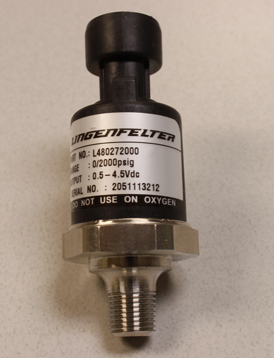
0-2000 psi nitrous pressure sensor:
Fuel pressure sensor harness (with labeling printed on the wires):
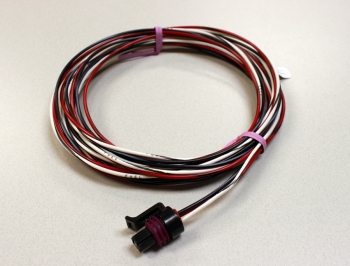
Nitrous pressure sensor harness (with labeling printed on the wires):
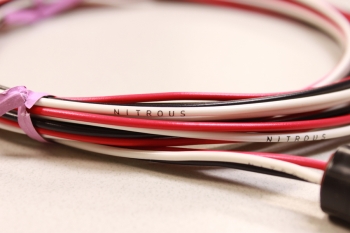
Nitrous controller harness (10ft wires with each wire color coded and with the label printed on each wire every 6 to 8 inches):

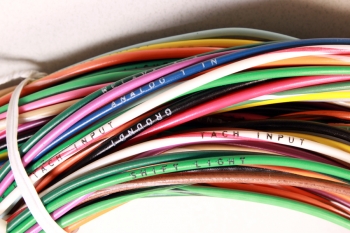
The harnesses are made using high quality automotive grade GPT wire for better durability and ease of installation.
0-15 psi fuel pressure sensor:
0-150 psi fuel pressure sensor:
0-2000 psi nitrous pressure sensor:
Fuel pressure sensor harness (with labeling printed on the wires):
Nitrous pressure sensor harness (with labeling printed on the wires):
Nitrous controller harness (10ft wires with each wire color coded and with the label printed on each wire every 6 to 8 inches):
The harnesses are made using high quality automotive grade GPT wire for better durability and ease of installation.


I know, right?! I remember, um, let's just say more than a few years ago, when an engineering professor I had was teaching us about designing to account for the "fool factor" which I now refer to with more modern language as the "dumb a** factor".
But the labeled cabling is pretty sweet.
But the labeled cabling is pretty sweet.
