







Help Can't get scanner to link up

Thread Starter
TECH Regular
Joined: Dec 2005
Posts: 407
Likes: 0
 Help Can't get scanner to link up
 Guys have a 69 Camaro with a Trailblazer SS LS2 and 4l70e, changed the camshaft and intake and in the process also put the battery in the trunk, now got a few codes and can't get my snap on scanner to log on, all the grounds etc seem good any ideas, this has got me in a bind, I now that if the scanner want log on my tunners software is sure not. THANKS!
I used to have a few problems, thought my grounds were good too.
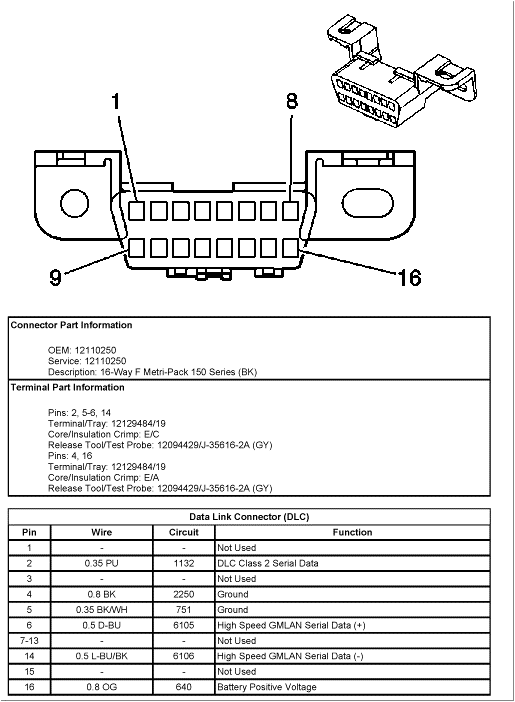
Pin 5 on the OBDII port needs to be on a common ground with the PCM. Once I changed that instead of just grounding to the body my connection problems were solved. Of course, you're problem might be different.
Pin 5 on the OBDII port needs to be on a common ground with the PCM. Once I changed that instead of just grounding to the body my connection problems were solved. Of course, you're problem might be different.
Thread Starter
TECH Regular
Joined: Dec 2005
Posts: 407
Likes: 0
Thanks guy's, now trying not to sound like a complete idiot but is pin 5 numbered on the connector, and do I need to ground this with the other pcm grounds, or separate, to chassis, body,etc man been a long couple of days with this problem just about burned lol, oh btw john at speartech done a rewire on the harness a couple of years back if this helps, I called him today a left a message maybe i'll here back from him tomorrow! THANKS!
I believe the TrailBlazer SS engine and PCM are CAN Bus. This means the previous pinout won't help you since the supplied graphic only lists OBDII (J1850 to the engineering types). If you look at my stolen drawing, there are two required pins for CAN bus high and low (6 and 14 respectively). This eliminates the need for pin 2, so don't be alarmed if there is no pin 2 on your harness.

Trending Topics
LS1 Tech Stories
The Best V8 Stories One Small Block at Time

6 Common C5 Corvette Failures and What's Involved In Repairing Them
Pouria Savadkouei
Retro Modern Bandit Pontiac Trans AM Comes With Burt Reynolds' Autograph
Verdad Gallardo
Top 10 Greatest Cadillac V Series Performance Models Ever, Ranked
Pouria Savadkouei
Top 10 Most Powerful Chevy Trucks Ever Made!

Hennessey's New Supercharged Silverado ZR2 Has 700 HP
Verdad Gallardo
Coachbuilt N2A Anteros Is an LS2-Powered C6 Corvette In Italian Clothes
Verdad Gallardo
Awesome K5 Blazer Restomod Comes With C7 Corvette Power
Verdad Gallardo
10 Camaros You Should Never Buy

10 LS Engine Myths That Refuse to Die
Verdad Gallardo
Great, another thing to check/keep track of...  So how likely is it that my 2007/2008 L92 uses the CAN bus, rather than OBD-II?? (I'm guessing that it's fairly likely, huh?)
So how likely is it that my 2007/2008 L92 uses the CAN bus, rather than OBD-II?? (I'm guessing that it's fairly likely, huh?) Thread Starter
TECH Regular
Joined: Dec 2005
Posts: 407
Likes: 0
Well guy's about throw in the towel on this one everything seems to check out as far as grounds, power wires etc, talked to john at speartech Friday and he said I would find it but no luck, im going to see if I can send it back to him to get checked out, any suggestions. THANKS!
Thread Starter
TECH Regular
Joined: Dec 2005
Posts: 407
Likes: 0
Oh btw guy's may just buy a new harness, always hated the way this one was built because of no place to mount the pcm but around the engine bay, fender well etc,also was looking at the holly efi stuff any input on this. THANKS!

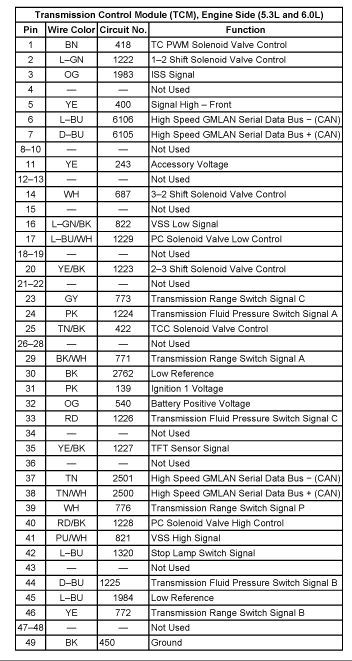
At the OBD2 connector, verify that you have ground on pins 5 and 6 and battery positive voltage on pin 16. At the TCM connector, verify that you have Accessory/Ignition voltage on Pin 11 (YE), Ignition voltage on Pin 31 (PK), B+ voltage on Pin 32 (OG), and Ground on Pin 49 (BK).
If all that tests good, check continuity on the High Speed GMLAN wires. The High Speed GMLAN wires are routed from the OBD2 port to the TCM and then out to the ECM.
Check continuity between the following points:
Pin 6 of the OBD2 Port and pin 7 (D-BU) of the TCM.
Pin 14 of the OBD2 Port and Pin 6 (L-BU) of the TCM.
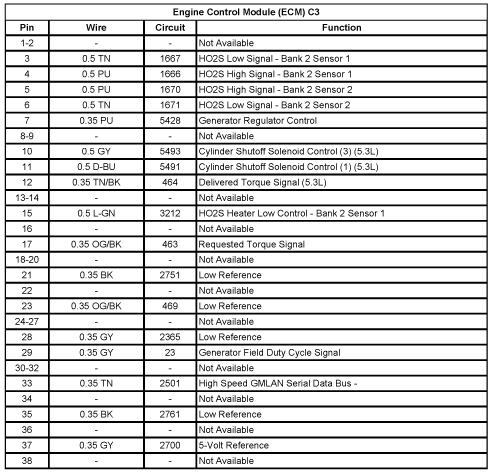
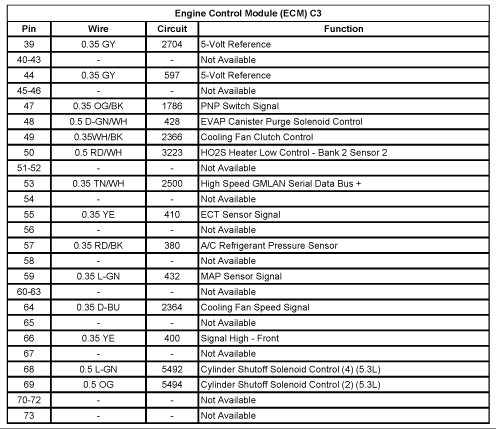
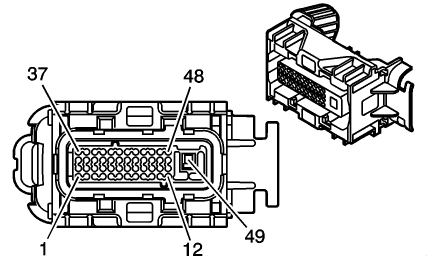
Pin 37 (TN) of the TCM and Pin 2 (TN) of the Blue ECM Connector if its a 2006 w/E40 ECM or Pin 33 (TN) of the Gray ECM connector if its a 07-09 w/ E67 ECM.
Pin 38 (TN/WH) of the TCM and Pin 1 (TN/WH) of the Blue ECM Connector if its a 2006 w/E40 ECM or Pin 53 (TN/WH) of the Gray ECM connector if its a 07-09 w/ E67 ECM.
If all of the above continuity checks test good, you may have a faulty TCM that is not passing serial data communication through to the ECM. I have seen this happen before. To test that you need to bypass the TCM. To bypass the TCM, unplug the TCM connector, get a couple of paper clips or some small wires, and make a jumper between TCM connector Pin 6 (L-BU) and Pin 37 (TN) and then another jumper between TCM connector Pin 7 (D-BU) and 38 (TN/WH). This will connect the 2 High Speed GMLAN wires at the OBD2 port directly to the ECM, bypassing the TCM, which should then allow you to connect to the ECM. If you are able to successfully connect to the ECM after making the jumpers, then you need to replace your TCM.
06 TBSS E40 Blue Connector

07-09 TBSS E67 Gray Connector
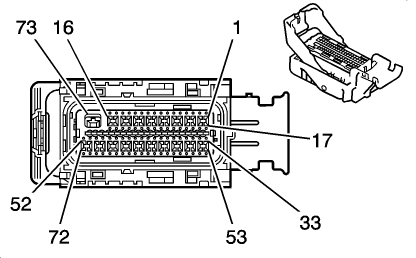
TCM Connector
OBD2 Connector
If all that tests good, check continuity on the High Speed GMLAN wires. The High Speed GMLAN wires are routed from the OBD2 port to the TCM and then out to the ECM.
Check continuity between the following points:
Pin 6 of the OBD2 Port and pin 7 (D-BU) of the TCM.
Pin 14 of the OBD2 Port and Pin 6 (L-BU) of the TCM.
Pin 37 (TN) of the TCM and Pin 2 (TN) of the Blue ECM Connector if its a 2006 w/E40 ECM or Pin 33 (TN) of the Gray ECM connector if its a 07-09 w/ E67 ECM.
Pin 38 (TN/WH) of the TCM and Pin 1 (TN/WH) of the Blue ECM Connector if its a 2006 w/E40 ECM or Pin 53 (TN/WH) of the Gray ECM connector if its a 07-09 w/ E67 ECM.
If all of the above continuity checks test good, you may have a faulty TCM that is not passing serial data communication through to the ECM. I have seen this happen before. To test that you need to bypass the TCM. To bypass the TCM, unplug the TCM connector, get a couple of paper clips or some small wires, and make a jumper between TCM connector Pin 6 (L-BU) and Pin 37 (TN) and then another jumper between TCM connector Pin 7 (D-BU) and 38 (TN/WH). This will connect the 2 High Speed GMLAN wires at the OBD2 port directly to the ECM, bypassing the TCM, which should then allow you to connect to the ECM. If you are able to successfully connect to the ECM after making the jumpers, then you need to replace your TCM.
06 TBSS E40 Blue Connector
07-09 TBSS E67 Gray Connector
TCM Connector
OBD2 Connector
Last edited by branndonw; Aug 4, 2014 at 03:32 AM.


Teching In
Joined: Jun 2017
Posts: 4
Likes: 0
At the OBD2 connector, verify that you have ground on pins 5 and 6 and battery positive voltage on pin 16. At the TCM connector, verify that you have Accessory/Ignition voltage on Pin 11 (YE), Ignition voltage on Pin 31 (PK), B+ voltage on Pin 32 (OG), and Ground on Pin 49 (BK).
If all that tests good, check continuity on the High Speed GMLAN wires. The High Speed GMLAN wires are routed from the OBD2 port to the TCM and then out to the ECM.
Check continuity between the following points:
Pin 6 of the OBD2 Port and pin 7 (D-BU) of the TCM.
Pin 14 of the OBD2 Port and Pin 6 (L-BU) of the TCM.
Pin 37 (TN) of the TCM and Pin 2 (TN) of the Blue ECM Connector if its a 2006 w/E40 ECM or Pin 33 (TN) of the Gray ECM connector if its a 07-09 w/ E67 ECM.
Pin 38 (TN/WH) of the TCM and Pin 1 (TN/WH) of the Blue ECM Connector if its a 2006 w/E40 ECM or Pin 53 (TN/WH) of the Gray ECM connector if its a 07-09 w/ E67 ECM.
If all of the above continuity checks test good, you may have a faulty TCM that is not passing serial data communication through to the ECM. I have seen this happen before. To test that you need to bypass the TCM. To bypass the TCM, unplug the TCM connector, get a couple of paper clips or some small wires, and make a jumper between TCM connector Pin 6 (L-BU) and Pin 37 (TN) and then another jumper between TCM connector Pin 7 (D-BU) and 38 (TN/WH). This will connect the 2 High Speed GMLAN wires at the OBD2 port directly to the ECM, bypassing the TCM, which should then allow you to connect to the ECM. If you are able to successfully connect to the ECM after making the jumpers, then you need to replace your TCM.
06 TBSS E40 Blue Connector
07-09 TBSS E67 Gray Connector
TCM Connector
OBD2 Connector
If all that tests good, check continuity on the High Speed GMLAN wires. The High Speed GMLAN wires are routed from the OBD2 port to the TCM and then out to the ECM.
Check continuity between the following points:
Pin 6 of the OBD2 Port and pin 7 (D-BU) of the TCM.
Pin 14 of the OBD2 Port and Pin 6 (L-BU) of the TCM.
Pin 37 (TN) of the TCM and Pin 2 (TN) of the Blue ECM Connector if its a 2006 w/E40 ECM or Pin 33 (TN) of the Gray ECM connector if its a 07-09 w/ E67 ECM.
Pin 38 (TN/WH) of the TCM and Pin 1 (TN/WH) of the Blue ECM Connector if its a 2006 w/E40 ECM or Pin 53 (TN/WH) of the Gray ECM connector if its a 07-09 w/ E67 ECM.
If all of the above continuity checks test good, you may have a faulty TCM that is not passing serial data communication through to the ECM. I have seen this happen before. To test that you need to bypass the TCM. To bypass the TCM, unplug the TCM connector, get a couple of paper clips or some small wires, and make a jumper between TCM connector Pin 6 (L-BU) and Pin 37 (TN) and then another jumper between TCM connector Pin 7 (D-BU) and 38 (TN/WH). This will connect the 2 High Speed GMLAN wires at the OBD2 port directly to the ECM, bypassing the TCM, which should then allow you to connect to the ECM. If you are able to successfully connect to the ECM after making the jumpers, then you need to replace your TCM.
06 TBSS E40 Blue Connector
07-09 TBSS E67 Gray Connector
TCM Connector
OBD2 Connector
