



IPod to GXP Nav unit

Thread Starter
Staging Lane
Joined: May 2007
Posts: 59
Likes: 0
From: Cleveland
 IPod to GXP Nav unit
 I've searched around a little on hear, and didn't see anything for this specific product. These adapters both would hijack the XM signal (which i dont use). Does anyone know which of the two would be the correct one though. I have the navigation, single CD unit with XM.
http://www.pac-audio.com/productDeta...&CategoryID=24
http://www.pac-audio.com/productDeta...&CategoryID=24
Thanks for any help you might have
http://www.pac-audio.com/productDeta...&CategoryID=24
http://www.pac-audio.com/productDeta...&CategoryID=24
Thanks for any help you might have
I've searched around a little on hear, and didn't see anything for this specific product. These adapters both would hijack the XM signal (which i dont use). Does anyone know which of the two would be the correct one though. I have the navigation, single CD unit with XM.
http://www.pac-audio.com/productDeta...&CategoryID=24
http://www.pac-audio.com/productDeta...&CategoryID=24
Thanks for any help you might have
http://www.pac-audio.com/productDeta...&CategoryID=24
http://www.pac-audio.com/productDeta...&CategoryID=24
Thanks for any help you might have
Thanks Mikzgp, I've seen that one before too, and will go with it if i need to, bi was just optimistic that the other would work also for $70 less
OEM as you actually get soft iPod buttons on your NAV screen and a search function among other features.
The PAL is the way to go.
Trending Topics
^ ^ ^ ^I dont know this demo is pretty bad. I will have to look into the GM pal now it looks bad *** too. do you know if the GM pal will it charge the ipod too?
Demo
http://www.coastaletech.com/ESCALADE%20IPOD%20DEMO.htm
Demo
http://www.coastaletech.com/ESCALADE%20IPOD%20DEMO.htm
Last edited by Mikzgp; Jan 23, 2010 at 01:41 PM.
LS1 Tech Stories
The Best V8 Stories One Small Block at Time

Topdon ONE vs. Artidiag 800 BT2: Which is the Diagnostic Tablet For You?
Pouria Savadkouei
Gas Monkey Built a 6-Wheel Ferrari Testarossa With a Corvette LT4 Engine
Verdad Gallardo
7 Most Reliable High-Performance Engines GM Has Ever Built
Verdad Gallardo
Amazing '71 Camaro Restomod Is Modern Muscle Car Under the Skin
Verdad Gallardo
6 Common C5 Corvette Failures and What's Involved In Repairing Them
Pouria Savadkouei
Retro Modern Bandit Pontiac Trans AM Comes With Burt Reynolds' Autograph
Verdad Gallardo
Top 10 Greatest Cadillac V Series Performance Models Ever, Ranked
Pouria Savadkouei
Top 10 Most Powerful Chevy Trucks Ever Made!

Hennessey's New Supercharged Silverado ZR2 Has 700 HP
Verdad Gallardo ^ ^ ^ ^I dont know this demo is pretty bad. I will have to look into the GM pal now it looks bad *** too. do you know if the GM pal will it charge the ipod too?
Demo
http://www.coastaletech.com/ESCALADE%20IPOD%20DEMO.htm
Demo
http://www.coastaletech.com/ESCALADE%20IPOD%20DEMO.htm
Yes, the PAL will charge the original iPhone and older iPods, but not the newer ones (this is due to Apple's recent change from firewire charging to USB).
Solutions:
http://www.discountcarstereo.com/detail.aspx?ID=1337
or
http://www.autosoundcentral.com/Peri...12_p/is712.htm
And from Ray about the iPod screen:
With all of the wiring connected, we turn on Nav unit and see what is different about the PAL controls. At first, it looks like the standard Nav screen:
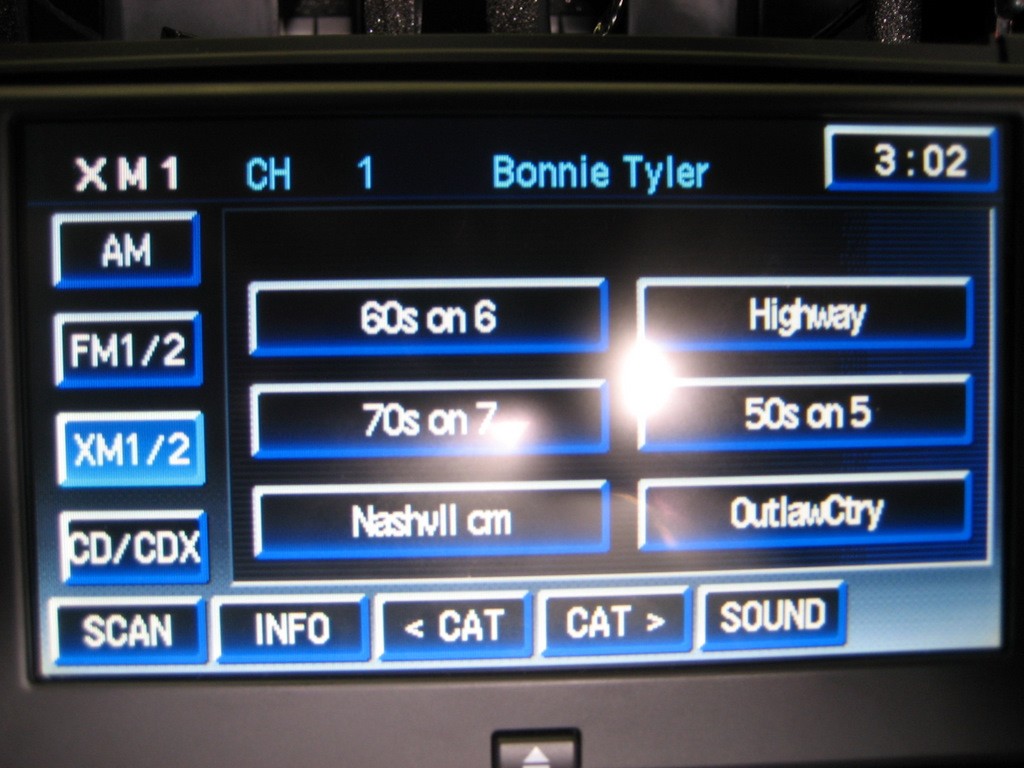
Push the XM1/2 soft button with the Ipod connected and you enter the Ipod mode (which replaces the XM2 mode):
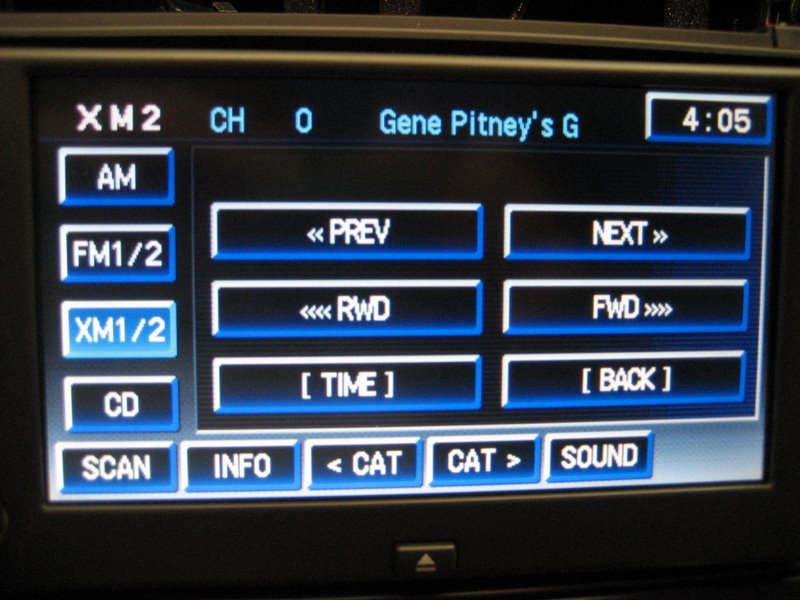
This is the Ipod Player screen. (For those of you with the factory external 6 CD changer, notice you lost the CD/CDX soft button. You get it back when you re-enter the XM1 mode, as in the first photo.)
The Player screen is the default screen, giving you a number of choices with the six soft buttons. Unlike all of the other Ipod adapters, these buttons actually read what they do!
The INFO button gives you the artist, song (or book) title, and the album.
The SCAN button allows you to enter two other screens. First, the Settings screen:
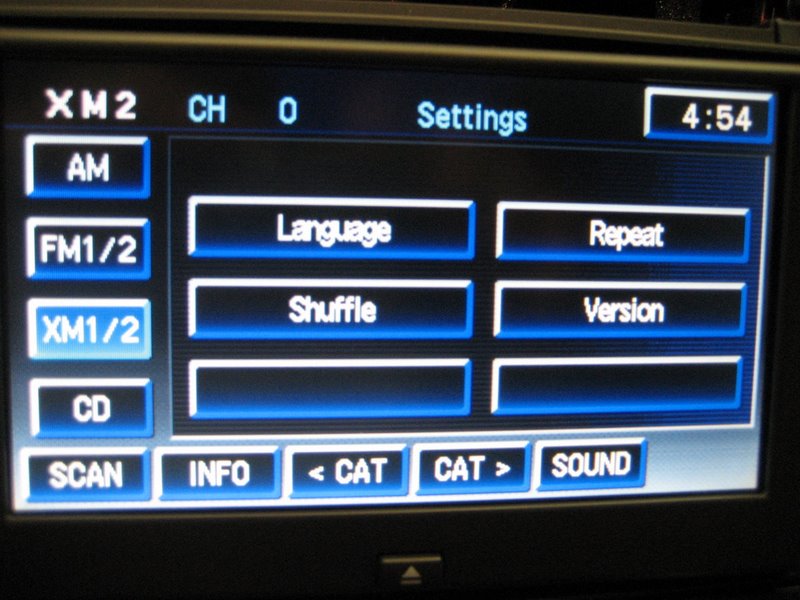
Another push of the SCAN button puts you into the Music screen:
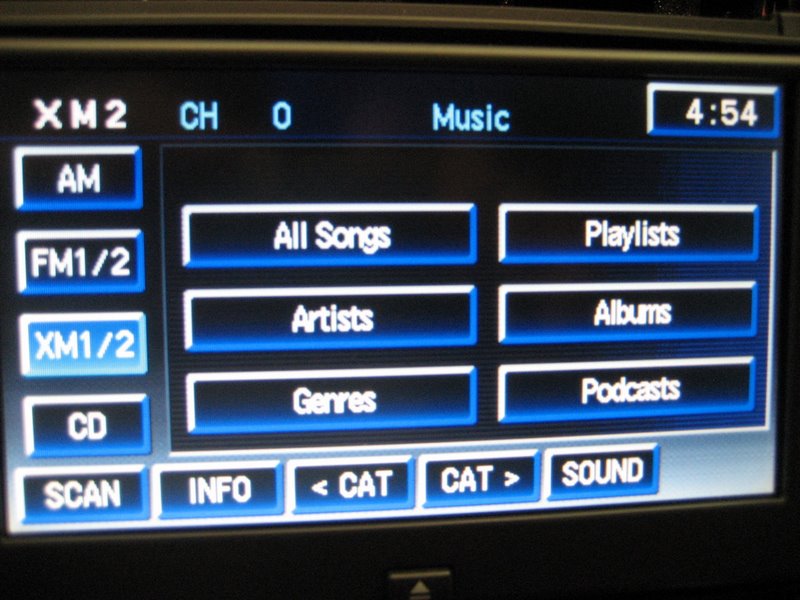
Here is where you can do your searches of music tracks, Playlists, Artists, Albums, etc. Audiobooks are in the Genre's category:
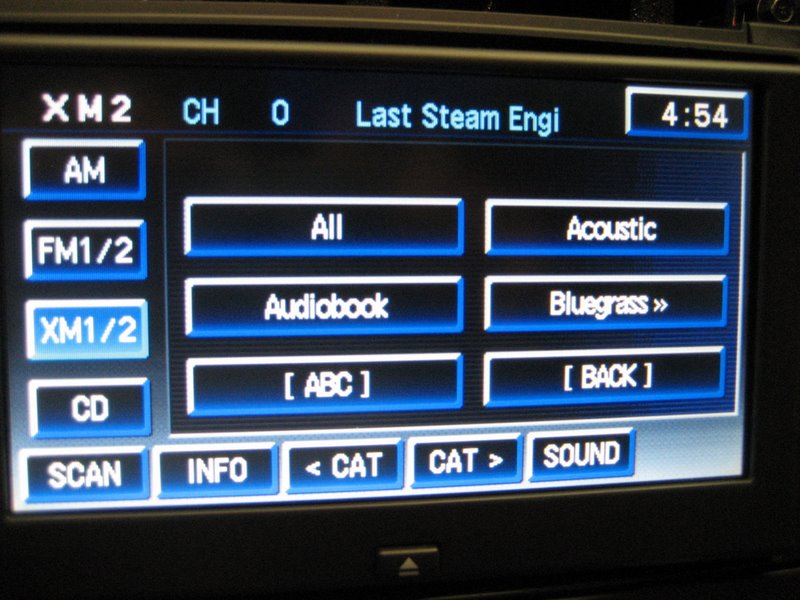
Here is an Artist search:
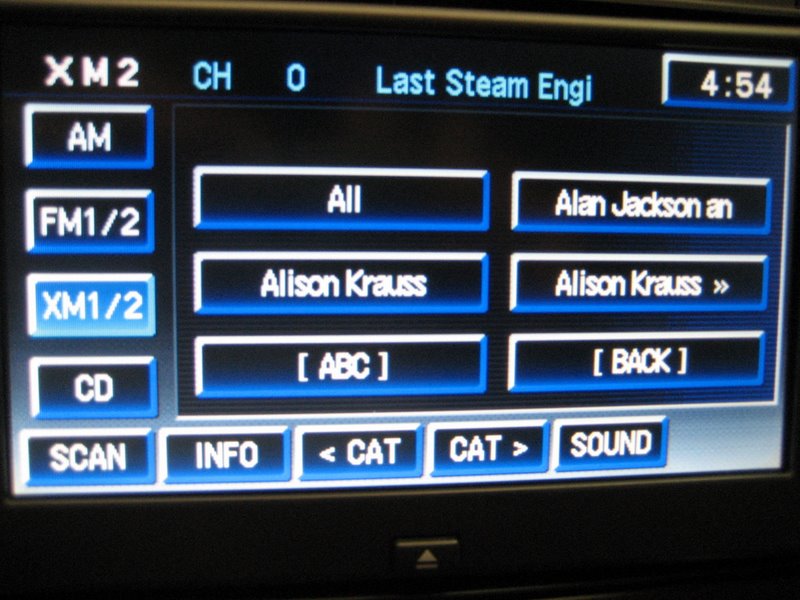
You can choose "All", then use the CAT > or < button to cycle through them, or do an "ABC search":
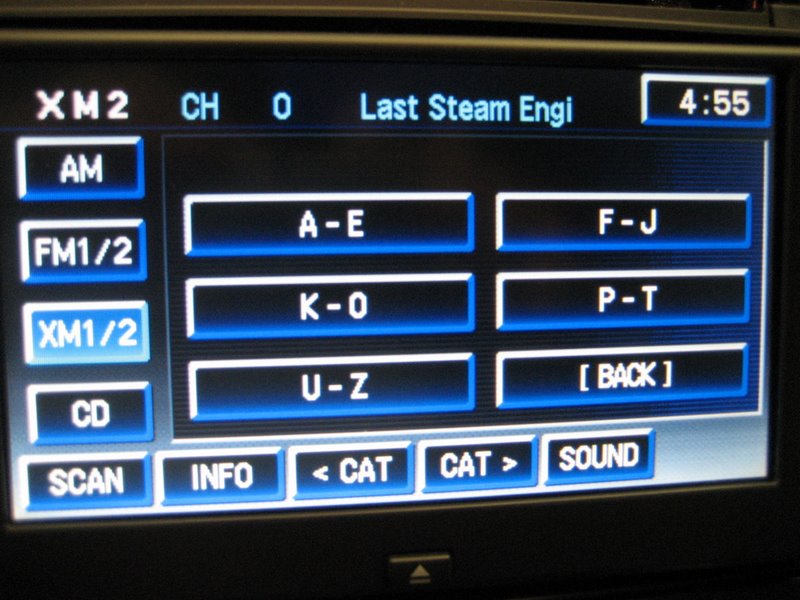
Each button narrows down your choices until you find the artist you want, then it lists the tracks or "All" to choose from.
Notice another nice feature is that most screens also have a "BACK" button, which allows you to go directly back to the previous screen.
Finally, here is what the Ipod screen looks like when connected to the PAL:
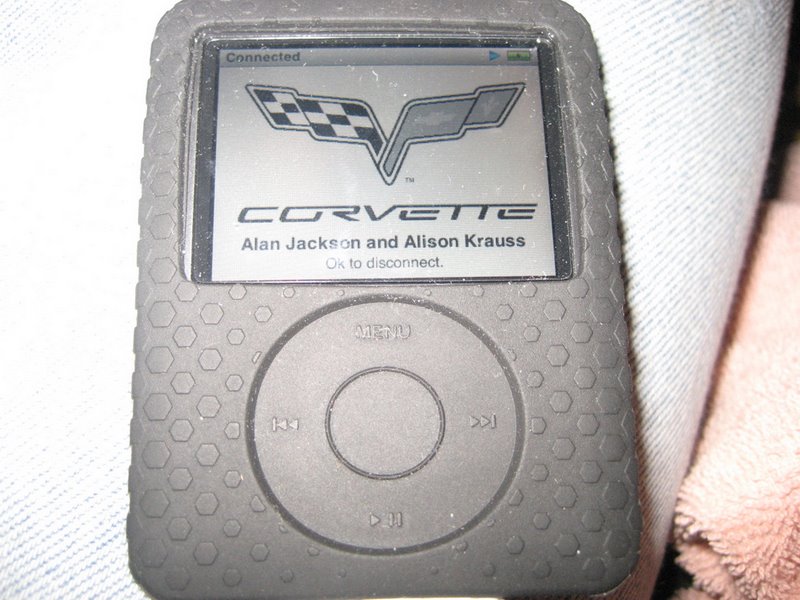
Push the XM1/2 soft button with the Ipod connected and you enter the Ipod mode (which replaces the XM2 mode):
This is the Ipod Player screen. (For those of you with the factory external 6 CD changer, notice you lost the CD/CDX soft button. You get it back when you re-enter the XM1 mode, as in the first photo.)
The Player screen is the default screen, giving you a number of choices with the six soft buttons. Unlike all of the other Ipod adapters, these buttons actually read what they do!
The INFO button gives you the artist, song (or book) title, and the album.
The SCAN button allows you to enter two other screens. First, the Settings screen:
Another push of the SCAN button puts you into the Music screen:
Here is where you can do your searches of music tracks, Playlists, Artists, Albums, etc. Audiobooks are in the Genre's category:
Here is an Artist search:
You can choose "All", then use the CAT > or < button to cycle through them, or do an "ABC search":
Each button narrows down your choices until you find the artist you want, then it lists the tracks or "All" to choose from.
Notice another nice feature is that most screens also have a "BACK" button, which allows you to go directly back to the previous screen.
Finally, here is what the Ipod screen looks like when connected to the PAL:
Lastly, buy an RCA to 1/8th inch/3.5mm Y-adapter, either male or female (you have four options on that page; 12ft male should be adequate):
Is this used to run to the center console for the ipod?
No, that would be from the C6 'vette.
Yes, but for an auxiliary input only (non iPods). However, you could plug in an iPod. I just wouldn't know why as you'd use Apple's proprietary 30 pin connector.
Personally, I'd find an extension cable for the iPod connector and I'd also run the 3.5mm cable into the center console.
Reason being, in case a friend of mine was riding in my car (as a passenger or driver) and didn't have an iPod, the option would still be there.
Yes, but for an auxiliary input only (non iPods). However, you could plug in an iPod. I just wouldn't know why as you'd use Apple's proprietary 30 pin connector.
Personally, I'd find an extension cable for the iPod connector and I'd also run the 3.5mm cable into the center console.
Reason being, in case a friend of mine was riding in my car (as a passenger or driver) and didn't have an iPod, the option would still be there.
No, that would be from the C6 'vette.
Yes, but for an auxiliary input only (non iPods). However, you could plug in an iPod. I just wouldn't know why as you'd use Apple's proprietary 30 pin connector.
Personally, I'd find an extension cable for the iPod connector and I'd also run the 3.5mm cable into the center console.
Reason being, in case a friend of mine was riding in my car (as a passenger or driver) and didn't have an iPod, the option would still be there.
Yes, but for an auxiliary input only (non iPods). However, you could plug in an iPod. I just wouldn't know why as you'd use Apple's proprietary 30 pin connector.
Personally, I'd find an extension cable for the iPod connector and I'd also run the 3.5mm cable into the center console.
Reason being, in case a friend of mine was riding in my car (as a passenger or driver) and didn't have an iPod, the option would still be there.
That's what I was thinking. Couldn't charge or show song titles that way with just the 3.5mm cable. But I never thought about using a friends MP3 player if they wanted to. I think you helped me pick the route I want to go. As soon as I get my Nav installed and I get it programed at the dealer (hope this week) I will order the GM pal then. Thanks for your help GXP25
Thread Starter
Staging Lane
Joined: May 2007
Posts: 59
Likes: 0
From: Cleveland
I received the PAC on Saturday and attempted to install on Sunday. After realizing that our stereo lacked a remote power source, i followed the directions from PAC and found an auxillary switched 12v source to run directly to the PAC unit. I ran just as the directions stated, with a 1amp in line fuse to protect the unit. This gave me a very soft bleed through of sound from the iphone...but when only 1 of 2 RCA inputs was connected. When both were connected, nothing but static. I played around with the ground trying several different very solid ground points and no change. I finally disconnected it from the 12v source at the fuse box and ran some wire directly to the battery....still nothing, the switch does not even engage. I'm out of ideas at this point, and seriously considering sending back. Open to any suggestions anyone might have.
Thanks
That's what I was thinking. Couldn't charge or show song titles that way with just the 3.5mm cable. But I never thought about using a friends MP3 player if they wanted to. I think you helped me pick the route I want to go. As soon as I get my Nav installed and I get it programed at the dealer (hope this week) I will order the GM pal then. Thanks for your help GXP25
The faster you do it (and prove that it works), the better it is for the rest of the community.
Will do.
I don't like his answer to question 18 though. Kills your thought on running the RCA's for some one else's MP3 player. Wonder when this will be fixed
http://www.kawal.net/PALFAQs.htm#11....%20used%20for?
Will do.
I don't like his answer to question 18 though. Kills your thought on running the RCA's for some one else's MP3 player. Wonder when this will be fixed
http://www.kawal.net/PALFAQs.htm#11....%20used%20for?
I don't like his answer to question 18 though. Kills your thought on running the RCA's for some one else's MP3 player. Wonder when this will be fixed
http://www.kawal.net/PALFAQs.htm#11....%20used%20for?
I didn't quite read that.
Correction: Aux input users would be better off with one of those PACs.
Well, I received my PAL yesterday and it works great. There are a few bugs but Ray is working in direct tandem with Mediatronics (the creators of the PAL for GM) and software updates are constantly being made. Eventually, there will be a way to update the PAL via USB on one's PC.
With this new version of the PAL (2.x), Aux input has been enabled.
Here's my post from the CorvetteForum:
Not a bad deal for $180.
More info about the GM PAL: http://www.kawal.net/PAL%20Rev%202.htm
Btw, Mediatronics is working on getting the PAL to work with other Class II vehicles. Since they have the PAL working in non-NAV C6 Corvettes, I expect other non-NAV Class II vehicles to follow.
With this new version of the PAL (2.x), Aux input has been enabled.
Here's my post from the CorvetteForum:
Originally Posted by GXP25
I own a 2006 Pontiac Grand Prix GXP with the same NAV unit and I received my PAL unit yesterday. I have the original iPhone.
The sound quality is great. It is miles above XM's compressed streams. I would argue though that it is less than an MP3 CD I have in the vehicle (comparing the same song, one on CD, the other on my iPhone).
The menus take a while to get used to. I did have a problem when doing an artist search, where sometimes pushing the "SCAN" button would make the menus go crazy.

The song title correctly displays on my HUD (my XM songs don't, only the station), albeit with a character limit. It would be nice if it could scroll. Likewise with all the other buttons displaying album names, etc. This could be a limitation of the NAV unit. My steering wheel controls work as well, except for the play button, which is defaulted to starting up the CD player.
Issues:
Requests:
Ideally, a menu like the CD menu is desirable, but I know we're limited due to interfacing with the XM connection/module.
I am sure more issues and requests will come up, but overall it's a good product and I anticipate future updates. :thumbs:
Thanks for all of your hard work Ray!
The sound quality is great. It is miles above XM's compressed streams. I would argue though that it is less than an MP3 CD I have in the vehicle (comparing the same song, one on CD, the other on my iPhone).
The menus take a while to get used to. I did have a problem when doing an artist search, where sometimes pushing the "SCAN" button would make the menus go crazy.
The song title correctly displays on my HUD (my XM songs don't, only the station), albeit with a character limit. It would be nice if it could scroll. Likewise with all the other buttons displaying album names, etc. This could be a limitation of the NAV unit. My steering wheel controls work as well, except for the play button, which is defaulted to starting up the CD player.
Issues:
- When music is playing, my NAV unit displays ": Playing" after displaying the song title and artist at the top. I'm not so sure if the colon is supposed to be there or not. Notice more errors in the menu.

- I encountered the XM playing for a bit before the PAL initializes. Like another member mentioned, this is probably due to the relay(s). [Un]Fortunately (?), since my vehicle is larger/longer, I do not get to hear the relays click.
- I lost XM once when the menus decided to hang. I "only" have 387 songs on my iPhone so I'm a little confused. I am not a mad button tapper; I allow time for the menus to load. So I had to go to the trunk and unplug the PAL and plug it back in to get the XM buttons back. Kind of annoying since mine sits behind my trunk's carpet above my rear driver side wheel well.
- When navigating through the menus, the volume tends to drop as the buttons are populating. It reverts to normal after they're done. But it is ongoing as one continues to navigate.
- I don't have an "[ ABC ]" button under my "All Songs" search. I can tap the button and search, it's just not populated with "[ ABC ]".

- Ray, one of the extra extension cables' female connector does not secure correctly (the one you sent me separately), creating severe connection issues with the PAL. The extra extension cable (in sealed clear plastic) included in my PAL kit works just fine though. Fortunately, it seems that only one single extension cable is sufficient for my vehicle.
Requests:
- In the settings menu, when tapping a button ("Language", "Shuffle", "Timeout", etc.), have it show the current setting instead of instantaneously changing the setting. A second tap would then effectively change the setting. Maybe the settings' values could be displayed above instead of on the actual buttons?
- Is it necessary to tap "CAT" twice to initialize scrolling?
- When tapping "[ TIME ]", are the extra zero place holders necessary?

Ideally, a menu like the CD menu is desirable, but I know we're limited due to interfacing with the XM connection/module.
I am sure more issues and requests will come up, but overall it's a good product and I anticipate future updates. :thumbs:
Thanks for all of your hard work Ray!
More info about the GM PAL: http://www.kawal.net/PAL%20Rev%202.htm
Btw, Mediatronics is working on getting the PAL to work with other Class II vehicles. Since they have the PAL working in non-NAV C6 Corvettes, I expect other non-NAV Class II vehicles to follow.
