


Tunerpro RT V5 Tutorial



Several posts up I gave a link to LT1 info which has an Excell spreadsheet for doing the speedo caculations, there is also a WOT locker which is an incredible difference at WOT. Use it on your bin and add about 20 % fuel to WOT... on a stock motot and you get close to 12.8 to 1 AFR with no O2 cross counts!


Thanks,
Ray
 oil level sesor Code 52
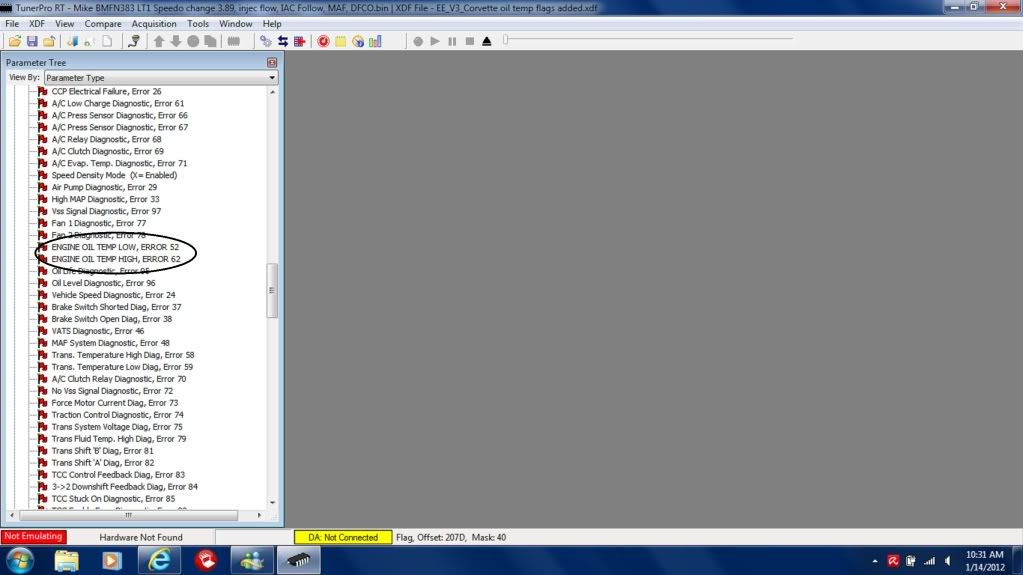
 I am running a Corvette bin on the Camaro I have been tunning and I am getting a SES light for code 52 Oil Temp sensor, which the Fbody does not have. Does any one have that flag added to an .XDF file? Or does anyone know the address so that I can add it to my .XDF and turn the bit off?

Thread Starter
TECH Senior Member
iTrader: (8)
Joined: Sep 2008
Posts: 5,130
Likes: 4
From: 6,000+ feet
Guys, I just wanted to update I used tunerpro for the first time tonight with Al's pause added at the beginning and it worked.... FLAWLESSLY.
It was rock solid smooth, just as good as my EFI Live logging software on OBD II vehicles.
Here is the code, you can open your EE_Auto.adx or EE_Manual.adx file and paste this code directly after the </adxheader> tag...
I will also be updating nightdash.txt the files available for download on my site with the pause added.
Thanks to Al for mentioning the fix. I should have tried it a long time ago!
It was rock solid smooth, just as good as my EFI Live logging software on OBD II vehicles.
Here is the code, you can open your EE_Auto.adx or EE_Manual.adx file and paste this code directly after the </adxheader> tag...
I will also be updating nightdash.txt the files available for download on my site with the pause added.
Thanks to Al for mentioning the fix. I should have tried it a long time ago!
Code:
  <ADXCLISTENSILENCE id="M1M0pause" idhash="0x5EF379D0" title="Mode 1 Message 0 Pause">
    <desc>Wait on packet drop</desc>
    <silencelen>0</silencelen>
    <totaltimeout>20</totaltimeout>
</ADXCLISTENSILENCE> 

Thread Starter
TECH Senior Member
iTrader: (8)
Joined: Sep 2008
Posts: 5,130
Likes: 4
From: 6,000+ feet
I am running a Corvette bin on the Camaro I have been tunning and I am getting a SES light for code 52 Oil Temp sensor, which the Fbody does not have. Does any one have that flag added to an .XDF file? Or does anyone know the address so that I can add it to my .XDF and turn the bit off?
It would be a flag or a switch, I have already found and added the flag.
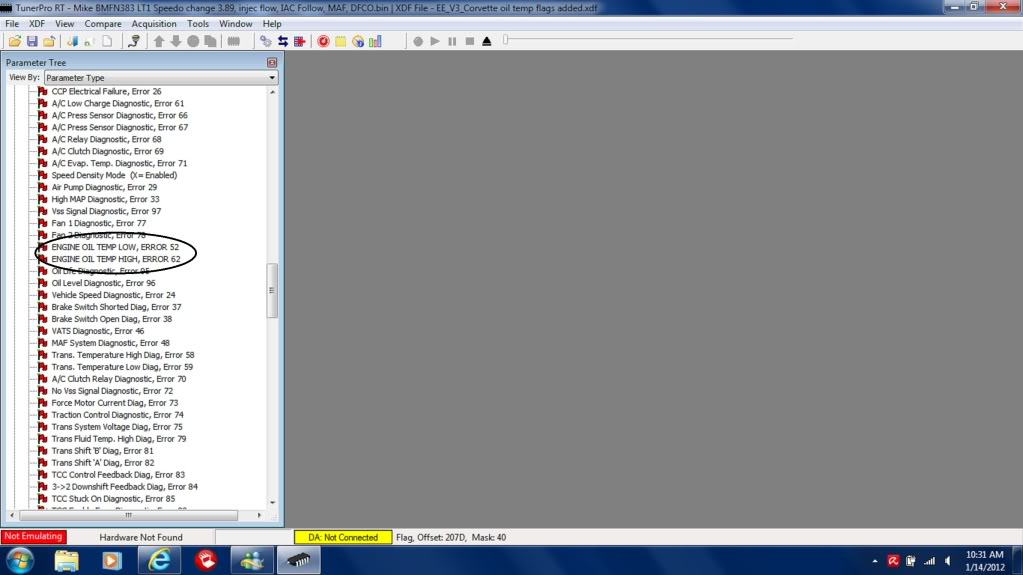
The Corvette is the only model that got the oil temp sensor. I cold not get the .xdf to upload even by changing it to a .txt. Send me a message if you want it.
The Corvette is the only model that got the oil temp sensor. I cold not get the .xdf to upload even by changing it to a .txt. Send me a message if you want it.
Last edited by 96lt4c4; Jan 14, 2012 at 10:11 AM.
Are you editing the .adx files through TunerPro? I've done some research on this and I can't figure it out. PM sent for site name.
Ray
Ray
Here is the code, you can open your EE_Auto.adx or EE_Manual.adx file and paste this code directly after the </adxheader> tag...
I will also be updating nightdash.txt the files available for download on my site with the pause added.
I will also be updating nightdash.txt the files available for download on my site with the pause added.
Code:
  <ADXCLISTENSILENCE id="M1M0pause" idhash="0x5EF379D0" title="Mode 1 Message 0 Pause">
    <desc>Wait on packet drop</desc>
    <silencelen>0</silencelen>
    <totaltimeout>20</totaltimeout>
</ADXCLISTENSILENCE> 


Thread Starter
TECH Senior Member
iTrader: (8)
Joined: Sep 2008
Posts: 5,130
Likes: 4
From: 6,000+ feet


Teching In
Joined: Sep 2011
Posts: 19
Likes: 0
http://www.gearhead-efi.com/Fuel-Inj...-sesor-Code-52
I've had a couple people say the adx still glitches and I checked it on other cars other then may LT1 and sure enoguh it did glitch on first connection, disconnect and reconnect and it was solid? Did this on three differant LT1 and all worked. It may be I have a macro to silence HVAC in my Buick LT1, if your remove the HVAC macro from Engine Connection may be the issue. But it still worked everytime but needed to be connected and got wrong data, then disconnect and reconnected and was correct no glitch data.
It has had the 20msec pause in it from begining...

Guys, I just wanted to update I used tunerpro for the first time tonight with Al's pause added at the beginning and it worked.... FLAWLESSLY.
It was rock solid smooth, just as good as my EFI Live logging software on OBD II vehicles.
Here is the code, you can open your EE_Auto.adx or EE_Manual.adx file and paste this code directly after the </adxheader> tag...
I will also be updating nightdash.txt the files available for download on my site with the pause added.
Thanks to Al for mentioning the fix. I should have tried it a long time ago!
It was rock solid smooth, just as good as my EFI Live logging software on OBD II vehicles.
Here is the code, you can open your EE_Auto.adx or EE_Manual.adx file and paste this code directly after the </adxheader> tag...
I will also be updating nightdash.txt the files available for download on my site with the pause added.
Thanks to Al for mentioning the fix. I should have tried it a long time ago!
Code:
  <ADXCLISTENSILENCE id="M1M0pause" idhash="0x5EF379D0" title="Mode 1 Message 0 Pause">
    <desc>Wait on packet drop</desc>
    <silencelen>0</silencelen>
    <totaltimeout>20</totaltimeout>
</ADXCLISTENSILENCE> I was trying to give TTS some business to get the latest version of Datamaster but their systems have been down for who knows how many days and they can't issue me an auth code. WTF? If this is how their customer service is, then I don't want any part of it.

I also have a question for those who have used the logging. For the data acquisition speed, how many records/frames per second does TunerPro capture? My old copy of Datamaster is only capturing 2 frames per second. Seems like that is pretty low compared to other logging tools.

Registered User
Joined: May 2012
Posts: 1
Likes: 0
 Tusind tak (In Danish it means a thousand thanks)
 My 1994 Pontiac SSEi is a great vehicle when it runs. I changed out every part known to GM and then some. When I changed the crankshaft position sensor and it wouldn't even srt, I gave in. I bought the TurnerPro V5 and started crying as soon as I installed the program. I spent hours trying to figure it out. Negative results. Next, I prayed until I fainted. Negative results. I then resorted to my duckduckgo.com search engine and up popped your tutorial link.
In fifteen minutes I was up and running.
You are to be commended.
Tusind tak.
In fifteen minutes I was up and running.
You are to be commended.
Tusind tak.


My cable from AKM has a dongle on it so I'm pretty sure you'll need that in addition to the cables. Andrew (AKM) sells the complete cable with the appropriate ends for your OBDI port/USB, dongle and a CD with the USB to Serial drivers.


