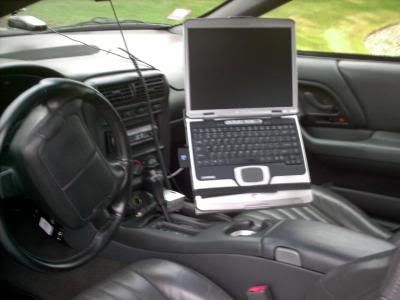









Post up your laptop mount pics
 Post up your laptop mount pics
 Just like the title says. Post up your laptop mount pics and then let me know where you got it from. Im thinkin about gettin myself one.
Here is a police style one for under $200 shipped. What a deal. Plus there are no bolts and pretty good passenger room. 
http://www.ram-mount.com/laptop_moun...aptop_desk.htm
http://www.ram-mount.com/laptop_moun...aptop_desk.htm
Trending Topics
Since F-body police cars exist I wonder if there is one true "police" mount that depts use. I just set mine in the passanger seat
Ed, thats a wickid setup you have. Laptop and camera mount, roll cage, top dropped, ready to roll
Ed, thats a wickid setup you have. Laptop and camera mount, roll cage, top dropped, ready to roll
LS1 Tech Stories
The Best V8 Stories One Small Block at Time

6 Common C5 Corvette Failures and What's Involved In Repairing Them
Pouria Savadkouei
Retro Modern Bandit Pontiac Trans AM Comes With Burt Reynolds' Autograph
Verdad Gallardo
Top 10 Greatest Cadillac V Series Performance Models Ever, Ranked
Pouria Savadkouei
Top 10 Most Powerful Chevy Trucks Ever Made!

Hennessey's New Supercharged Silverado ZR2 Has 700 HP
Verdad Gallardo
Coachbuilt N2A Anteros Is an LS2-Powered C6 Corvette In Italian Clothes
Verdad Gallardo
Awesome K5 Blazer Restomod Comes With C7 Corvette Power
Verdad Gallardo
10 Camaros You Should Never Buy

10 LS Engine Myths That Refuse to Die
Verdad Gallardo
I'm not Ed but I'll chime in.
1) No drilling required. Uses factor front bolt/nuts on seat bracket.
2) Depends. If you wonder if a passenger can sit there while you have the computer, yes. Is there a lot of room, no. You can remove the pedistal and assembly in less then 5mins if you want to haul a passenger. I keep mine in my car all the time unless I know I will have someone with me then I just take it out.
1) No drilling required. Uses factor front bolt/nuts on seat bracket.
2) Depends. If you wonder if a passenger can sit there while you have the computer, yes. Is there a lot of room, no. You can remove the pedistal and assembly in less then 5mins if you want to haul a passenger. I keep mine in my car all the time unless I know I will have someone with me then I just take it out.
Originally Posted by Black02SS
I'm not Ed but I'll chime in.
1) No drilling required. Uses factor front bolt/nuts on seat bracket.
2) Depends. If you wonder if a passenger can sit there while you have the computer, yes. Is there a lot of room, no. You can remove the pedistal and assembly in less then 5mins if you want to haul a passenger. I keep mine in my car all the time unless I know I will have someone with me then I just take it out.
1) No drilling required. Uses factor front bolt/nuts on seat bracket.
2) Depends. If you wonder if a passenger can sit there while you have the computer, yes. Is there a lot of room, no. You can remove the pedistal and assembly in less then 5mins if you want to haul a passenger. I keep mine in my car all the time unless I know I will have someone with me then I just take it out.


TECH Fanatic


Joined: Jun 2003
Posts: 1,869
Likes: 99
No pics, but I have a Jotto Desk. Very high quality.
http://www.jottodesk.us/chev_pontiac..._car_desks.htm
http://www.jottodesk.us/chev_pontiac..._car_desks.htm
Originally Posted by Silverhawk_02TA
Ed or Black02SS: Do you know if your mount will fit a large 17" laptop?
TECH Fanatic
Joined: Jun 2003
Posts: 1,869
Likes: 99
Originally Posted by Black02SS
I don't see why it wouldn't. You can adjust the straps that hold the base of the computer to the base of the stand. If the base of your laptop is wider then the stand, I assume you can just adjust the straps. If you want to measure how wide yours is I can go out and measure my base for you.
10" x 12" x 1"
ABS plastic desktop with 1/4" thick wall
6" square 11 gauge steel mounting plate
5/8" aluminum post connector.
I have a 15 inch laptop. You will have overhang, that is all.
I suggest you get an optional Screen Holder (for your 17 inch) screen. The bigger the screen, the more weight. It's going to want to close on you when driving (especially fast stops and starts). The screenholder holds the screen open.
Vist the Jotto Desk site for pictures and videos.
http://www.jottodesk.us/gmc_g700_car_desk.htm
Or....save the money you will use to purchase the computer stand and use it to upgrade to the EFI live handheld.
Last edited by dlandsvZ28; Jan 14, 2006 at 12:28 PM.
Originally Posted by dlandsvZ28
I suggest you get an optional Screen Holder (for your 17 inch) screen. The bigger the screen, the more weight. It's going to want to close on you when driving (especially fast stops and starts). The screenholder holds the screen open.
Originally Posted by dlandsvZ28
Or....save the money you will use to purchase the computer stand and use it to upgrade to the EFI live handheld.